The TV itself is of less interest to fewer people, but it remains very attractive as a center for multimedia entertainment. Especially when it comes to models with a large screen size and Smart TV support. In this case, it can perform several functions at once. Firstly, it serves as a home theater for the most comfortable movie viewing. Secondly, it is a huge window into the world of internet entertainment, games, and Android applications. Thirdly, you can connect a desktop computer to it and use it to run Windows games.
The main thing is that such a universal solution can be found at a very attractive price. For example, the 55-inch Vinga E55UHD20B TV with Smart TV support and pre-installed Android 6.0 OS will cost you 14,999 UAH ($536). Let's evaluate its functional capabilities and calibration quality, but first, let's get acquainted with the key features.
Specification
|
Model |
Vinga E55UHD20B |
|
Panel Type |
LCD with Edge LED backlighting |
|
Diagonal, inches |
55 |
|
Aspect Ratio |
16:9 |
|
Maximum Resolution |
3840 x 2160 |
|
Response Time GtG, ms |
6 |
|
Brightness, cd/m2 |
300 |
|
Contrast Ratio |
1200:1 |
|
Color System Standards Support |
SECAM, PAL |
|
Tuner Type |
Analog, Digital (DVB-C, DVB-T, DVB-T2) |
|
Smart TV Support |
Yes |
|
Wi-Fi Support |
802.11b/g/n |
|
OS |
Android 6.0 |
|
Built-in Speaker Power, W |
16 (2 x 8) |
|
Processor |
Dual-core ARM Cortex A9 |
|
Processor Frequency, GHz |
1.2 |
|
Video Core |
ARM Mali-T450MP2 |
|
RAM, GB |
1.5 |
|
Internal Storage, GB |
8 |
|
Digital Video Decoding Support |
MPEG-2 MP@ML, H.265 |
|
Video Decoding from USB Support |
MPEG-2, MPEG-4, H.264 |
|
Interfaces |
1 x CI 1 x 3.5mm for headphones 1 x RF (T2) 2 x USB 3 x HDMI 1 x Component In (Y/Pb/Pr) 1 x Coax-Out |
|
Typical Power Consumption in Active Mode, W |
130 |
|
VESA Mount Support, mm |
300 x 200 |
|
Dimensions with Stand / without Stand, mm |
1241.7 x 52.5 x 767.4 / 1241.7 x 52.2 x 719.3 |
|
Weight with Stand / without Stand, kg |
17 / 16.9 |
|
Manufacturer's Website |
|
|
Product Page |
|
|
Purchase Page |
Packaging and Delivery Set
The Vinga E55UHD20B comes in a regular cardboard box with good informational content. On its sides, there is an image of the TV itself, a brief list of its technical characteristics, and features. Special attention is drawn to the "e-led" icon, indicating Edge LED backlighting. This technology provides decent image brightness with a thinner matrix than Direct LED. This is what allowed the overall thickness of the TV to be reduced.
The delivery set includes paper documentation, an audio cable for the Audio-In Component interface, legs and screws for their attachment, a remote control, and a pair of AAA batteries for its power supply.
The remote control is made of matte plastic. It is quite long but fits comfortably in the hand and allows you to switch channels, adjust the volume of the built-in speakers, navigate the menu, and activate additional functions. Almost every button is labeled or has a clear icon. The user manual provides the purpose of each button. The remote worked fine, and it doesn't need to be pointed at the TV to activate it.
Appearance and Features of Use
Even when turned off, the Vinga E55UHD20B TV looks stylish and presentable due to the relatively thin bezels around the screen and elegant legs at the edges, which securely hold it on a flat surface. You can change its height, but there is also the option for wall mounting thanks to the VESA bracket.
The legs are labeled with the letters «L» and «R». Similar markings are also at the attachment points, so there's no confusion. There were no problems with their installation. There are small rubber inserts on the tips, which increase stability and reduce the risk of damage to the table surface. Closer to the right side is the power button, and in the center are the openings for sound output and improving the internal temperature regime.
The power supply and other electronic components are integrated into the body, making the lower part wider than the upper part. The VESA bracket holes are located in the center. On the left side is the power supply unit itself and a service sticker with technical information.
On the right side, all available external interfaces are located. They are directed downwards or sideways, maintaining easy access in case of wall mounting. It's also much more convenient to route interface cables. All connectors are labeled, minimizing the time to find the required port.
Also nearby, you can clearly see that the back surface is covered with a special pattern that effectively hides dust and fingerprints.
In the lower right corner of the back side, there are three useful elements:
- menu call button;
- button to switch the TV to energy-saving mode;
- 4-position joystick with an «OK» button in the center for navigating the menu and selecting necessary items.
The activity indicator is located in the lower left part of the upper side. In standby mode, it glows blue, and when the TV is turned on, it turns off, so it doesn't distract attention during viewing.
Now let's talk a bit about the functional capabilities of the Vinga E55UHD20B. It includes two 8-watt speakers with decent overall sound quality. Their volume is sufficient to fill a medium-sized room. The frequency range is dominated by highs, and there is a lack of bass. But if you decide to create a home theater, you will still buy additional acoustics.
The presence of a built-in tuner supporting the DVB-T2 standard allows you to watch digital channels in excellent quality. The main thing is that the antenna receives the signal well.
SmartTV is implemented based on a dual-core processor (ARM Cortex A9 @ 1.2 GHz; iGPU ARM Mali-T450MP2), 1.5 GB of RAM, and 8 GB of permanent memory (more than 4 GB available after turning on). The TV operates under the Android 6.0 OS with full access to the Google Play app store.
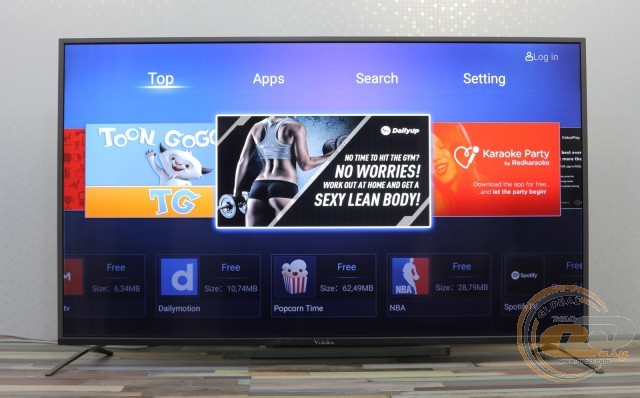
This allows you to install useful and not-so-useful apps, as well as play Android games. However, the performance level of the hardware platform is relatively low, so you can only entertain yourself with the simplest games.
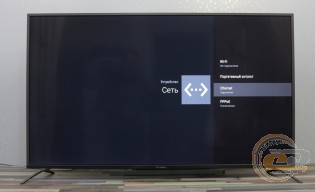
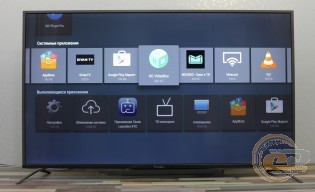
To access the internet, you can use either the built-in Wi-Fi module or an Ethernet cable. By default, the TV already has a number of useful apps installed, mainly for video viewing. There is even a Miracast function, which allows you to display video from a compatible smartphone or tablet on the screen.
The full settings menu looks like this.
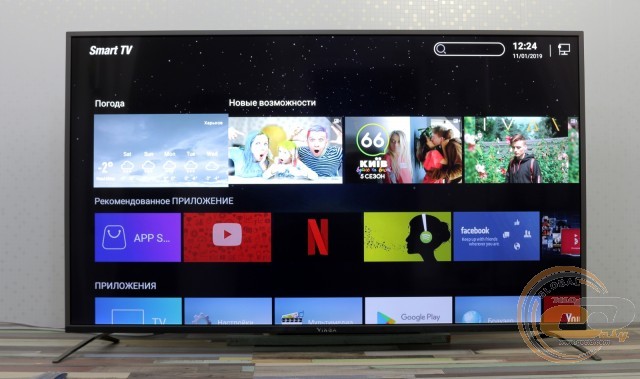
And thanks to the presence of two USB 2.0 ports, you can watch movies directly from a flash drive or external storage without connecting to the internet or a PC.
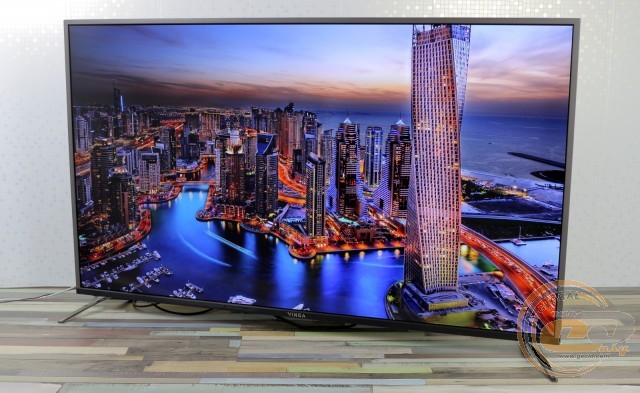
Overall, the TV's performance did not cause any complaints: the picture delights with vivid colors and the absence of any distortions. Watching videos in 4K and Full HD resolution does not cause any delays or slowdowns. The build quality of the body also left a pleasant impression.
On-Screen Menu
To access the menu and adjust settings, you can use the controls on the back or the remote control. The functional capabilities allow you to select the input signal source, set the image profile or audio subsystem mode, set the time, specify the image format, change the color temperature, and much more. The presence of Ukrainian and Russian language localization in the menu was pleasing.
Testing
During the testing of the Vinga E55UHD20B TV, the hardware platform was the ZOTAC ZBOX nano ID65 PLUS mini-computer. A full description of the methodology for researching characteristics can be found in this material.
The display has four color profiles: «Light», «User», «Standard», and «Soft». For convenience, we have compiled all their parameters in a single table:
|
Profile |
«Light» |
«User» |
«Standard» |
«Soft» |
|
White field brightness, cd/m2 |
316.4 |
297 |
296.4 |
274.9 |
|
Black field brightness, cd/m2 |
0.2891 |
0.2888 |
0.2895 |
0.2893 |
|
Contrast ratio |
1094:1 |
1029:1 |
1024:1 |
950:1 |
|
White point color temperature, K |
9686 |
11251 |
11346 |
11641 |
|
sRGB color space compliance, % |
86.4 |
89.0 |
88.9 |
84.0 |
|
Adobe RGB color space compliance, % |
59.5 |
61.3 |
62.1 |
57.9 |
|
Average deviation dE*94 (∆E) |
12.18 |
10.92 |
10.79 |
9.53 |
|
Maximum deviation dE*94 (∆E) |
27.15 |
24.39 |
23.81 |
21.34 |
|
Average gamma |
1.05 |
1.22 |
1.22 |
1.43 |
|
Power consumption, W |
92 |
92 |
92 |
92 |
Traditionally, let's start the analysis with brightness, contrast, and color temperature indicators. There are no particular issues with the first two: the brightness is indeed within the range of 300 cd/m2 (the Edge LED backlight performs its task well), so sunlight through the window is not a problem, and the static contrast slightly falls short of the declared 1200:1, but nothing critical. However, the color temperature is significantly overestimated: instead of the normal 6500 K, we get 9000 - 11,000 K, so the image will be cooler than usual.
Color Coverage
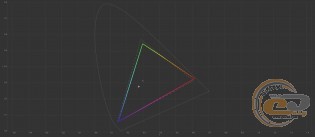
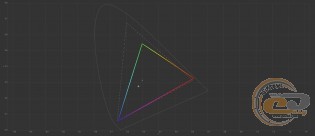
CIE diagrams of the "Light" profile for sRGB and Adobe RGB spaces
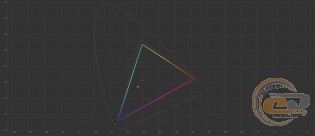

CIE diagrams of the "User" profile for sRGB and Adobe RGB spaces
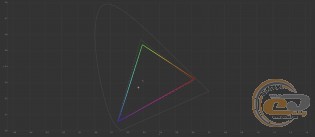

CIE diagrams of the "Standard" profile for sRGB and Adobe RGB spaces
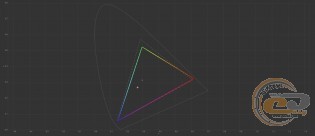

CIE diagrams of the "Soft" profile for sRGB and Adobe RGB spaces
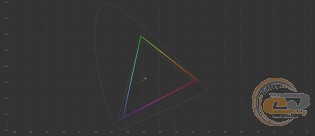
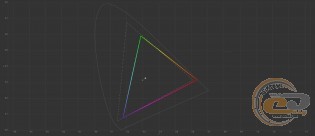
For non-professional monitors and TVs, good indicators are considered to be 90% coverage of the sRGB palette and 65% for Adobe RGB. Vinga E55UHD20B slightly falls short of these figures (89% and 62% respectively), but we did not experience any discomfort while watching TV shows or movies because of this.
We will not evaluate the CIE diagrams for the Adobe RGB space - they are important when considering professional monitors, and for sRGB we see the same picture: a noticeable shift of two reference points and minimal in the third. As a result, there will be a deficiency in the area of yellow, green, and blue shades.
Color Accuracy
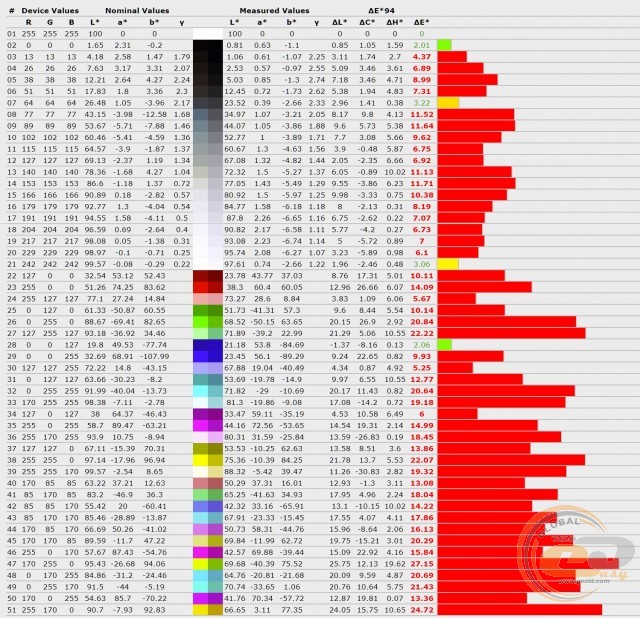
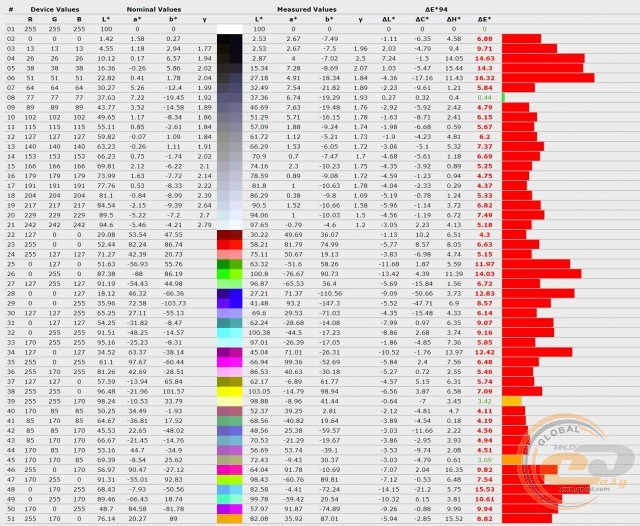
Deviation diagram of primary colors and shades from the "Light" profile standards
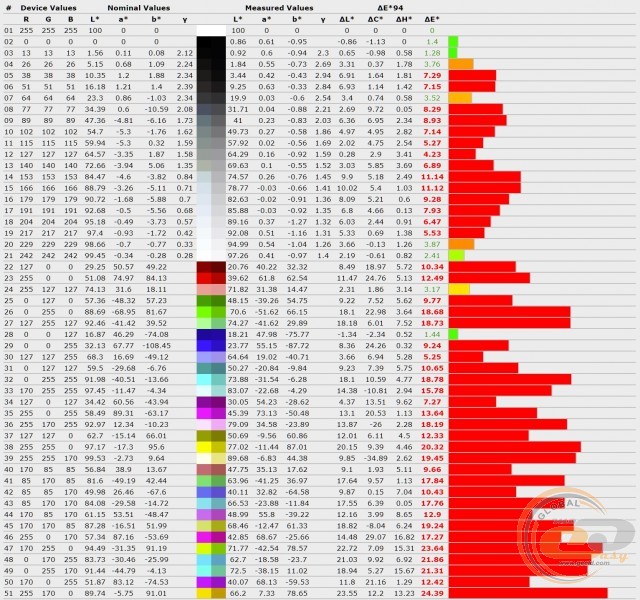
Deviation diagram of primary colors and shades from the "User" profile standards
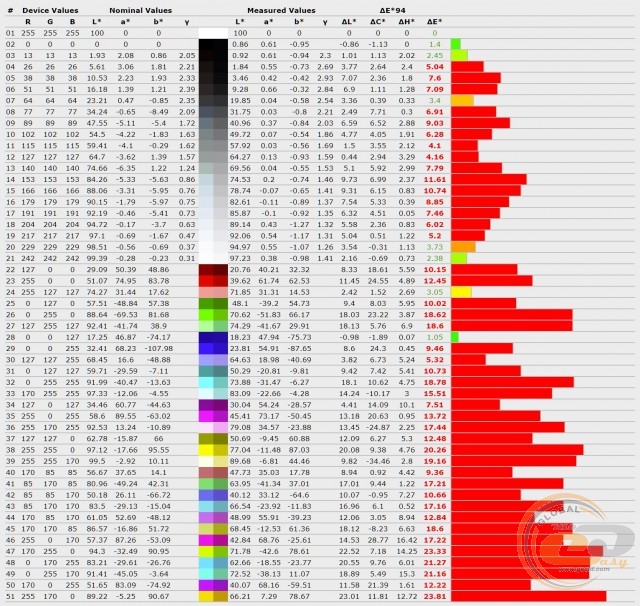
Deviation diagram of primary colors and shades from the "Standard" profile standards
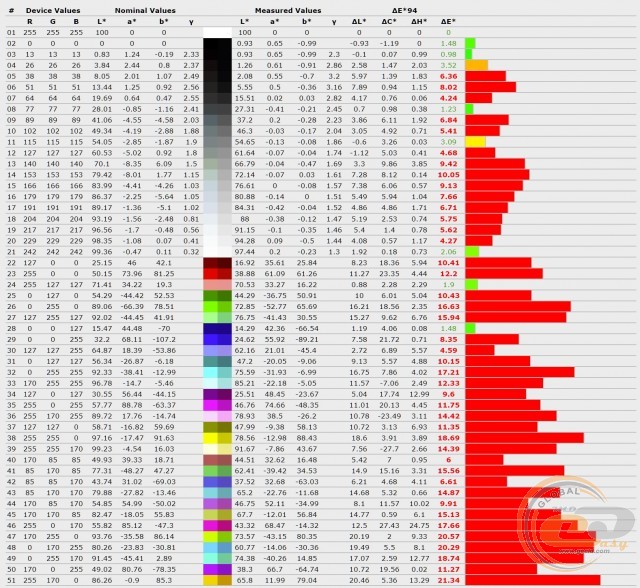
However, none of these profiles can boast high color and shade accuracy. In all cases, the average and maximum deviation ΔE were much higher than 1.5 and 4, respectively.
RGB Levels
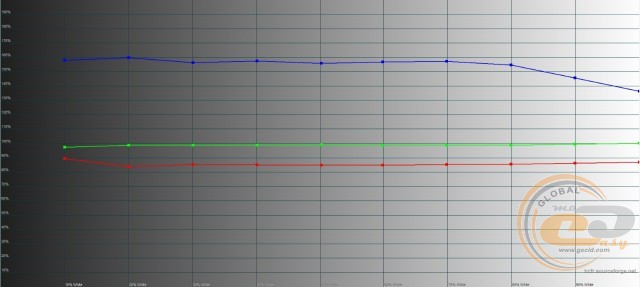
RGB levels graph of the "Light" profile
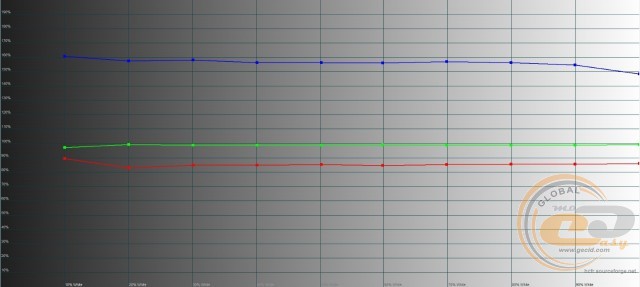
RGB levels graph of the "User" profile
RGB level chart for the "Standard" profile
RGB level chart for the "Soft" profile
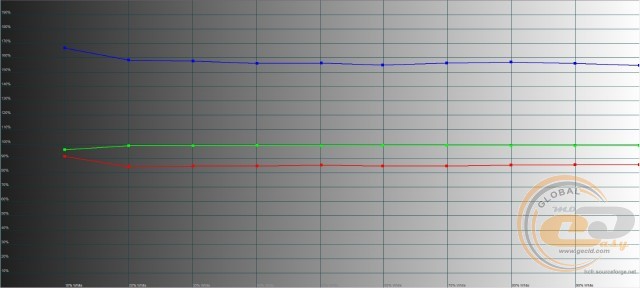
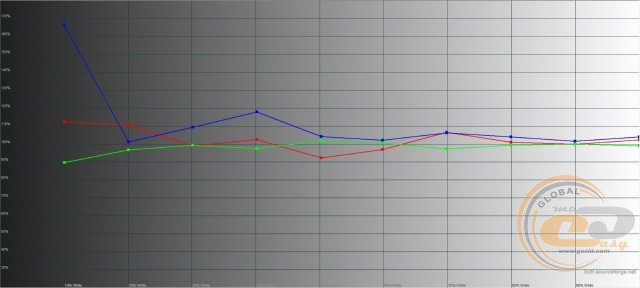
Very often in monitors and TVs, the blue component is exaggerated to make the screen image appear cooler for an impressive display of water, ice, sky, etc. The same approach is observed here: perfect green component setting, slightly lowered red (80% - 90%), and significantly exaggerated blue (130% - 170%).
Gamma
Gamma curve chart for the "Light" profile
Gamma curve chart for the "User" profile
Gamma curve chart for the "Standard" profile
Gamma curve chart for the "Soft" profile
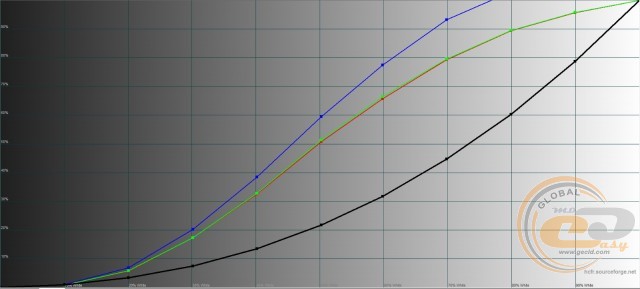
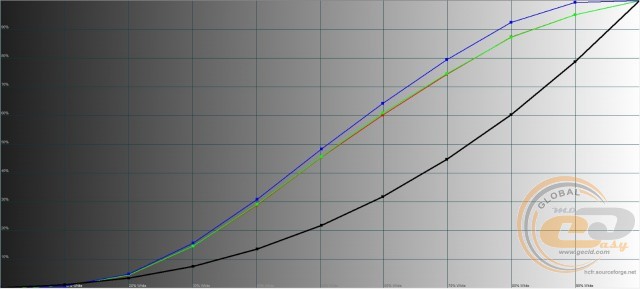
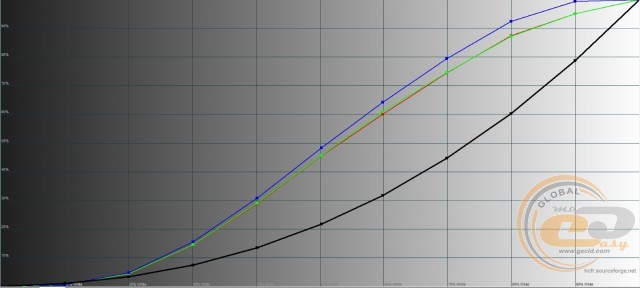
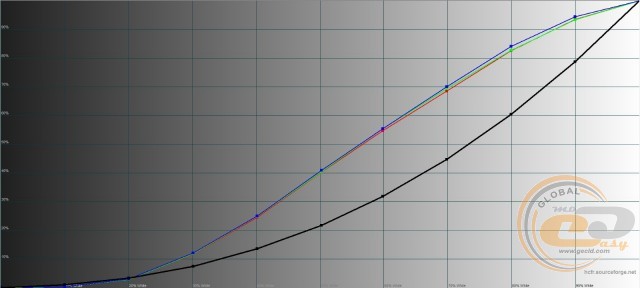
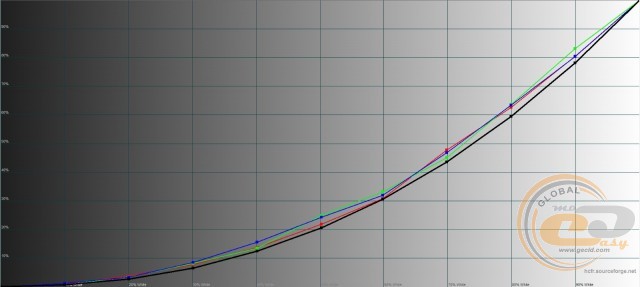
There are also issues with the gamma curve settings: in all profiles, they are above the reference black line, which may cause overexposure of midtones and loss of detail in light areas of the image. The best situation in this regard is with the "Soft" profile, while the "Light" profile performed the worst.
Brightness range
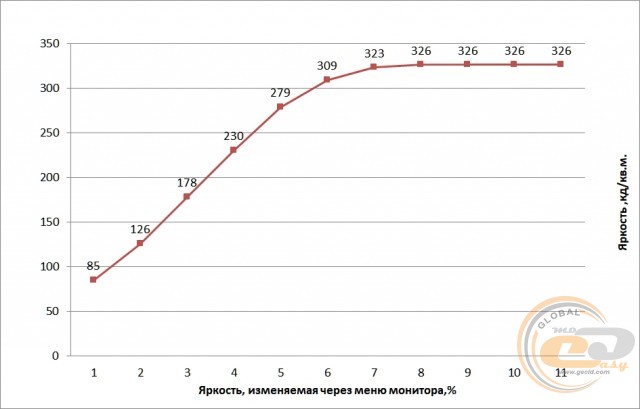
Based on the test results, the most balanced profile in the Vinga E55UHD20B TV is the "User" profile, so further research was conducted based on it.
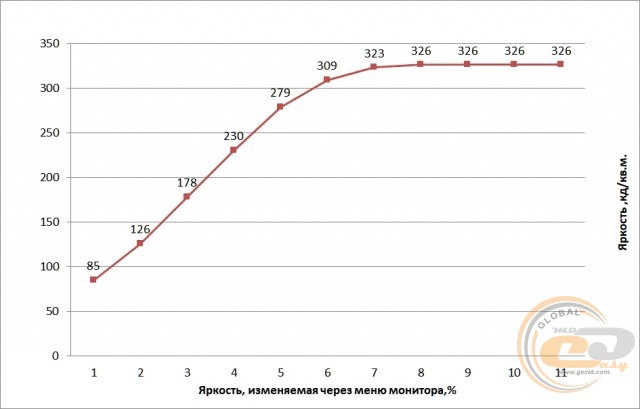
Brightness ranges from 85 to 326 cd/m2. The minimum value may be slightly excessive for viewing during dark hours, while the upper limit ensures comfortable operation in bright sunlight conditions.
Monitor calibration
CIE diagrams of the calibrated profile for sRGB and Adobe RGB spaces
Diagram of the deviation of primary colors and shades from the standards in the calibrated profile
RGB level chart of the calibrated profile
Gamma curve chart in the calibrated profile
The file with calibration parameters is available at this link. The results obtained before and after hardware calibration are summarized in the table.
|
Parameters |
"User" |
Calibrated |
|
White field brightness, cd/m2 |
297 |
96.8 |
|
Black field brightness, cd/m2 |
0.2888 |
0.2732 |
|
Contrast ratio |
1029:1 |
354:1 |
|
White point color temperature, K |
11251 |
5894 |
|
Color space compliance with sRGB standard, % |
89.0 |
102 |
|
Color space compliance with Adobe RGB standard, % |
61.3 |
70.3 |
|
Average deviation dE*94 (∆E) |
10.92 |
7.32 |
|
Maximum deviation dE*94 (∆E) |
24.39 |
16.32 |
|
Average gamma |
1.22 |
2.08 |
|
Power consumption, W |
92 |
89 |
Thanks to manual calibration, it was possible to improve the coverage of sRGB and Adobe RGB color spaces, normalize the RGB level and gamma curve charts, enhance the average gamma and white point color temperature, and slightly improve the accuracy of shade reproduction. Therefore, if possible, manual calibration is recommended.
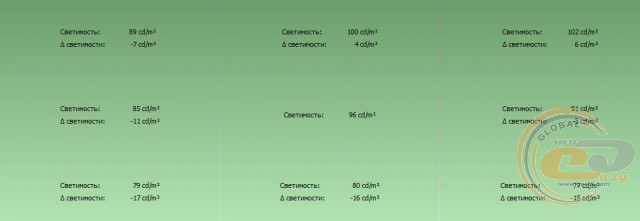
Screen backlight uniformity
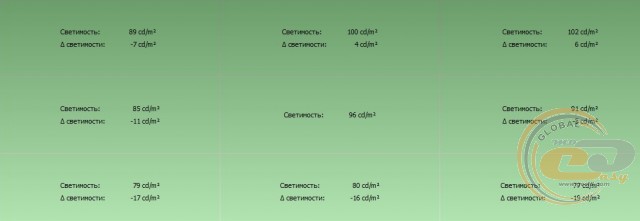
The maximum brightness deviation relative to the central area does not exceed 19 cd/m2 - not perfect, but a good result.
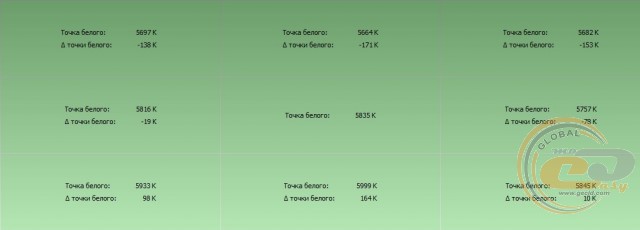
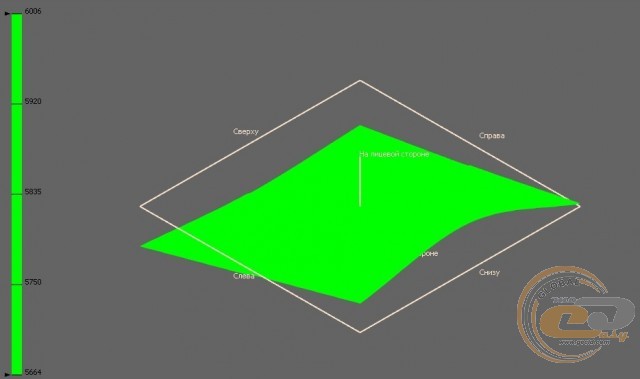
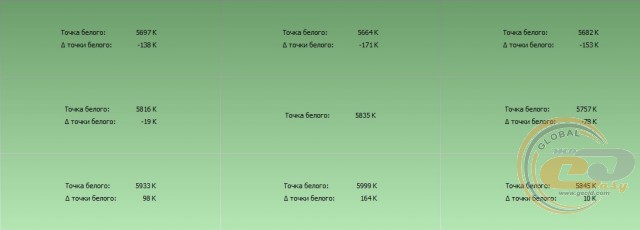
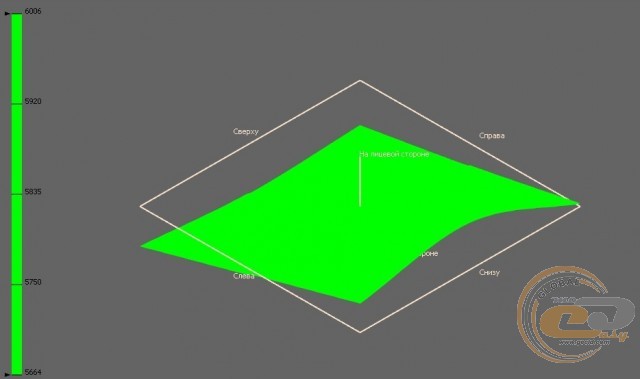
Everything is fine with the Vinga E55UHD20B and the white point temperature: in no area does the deviation exceed the permissible range of ±250 K, so there are no problems on the 3D diagram.
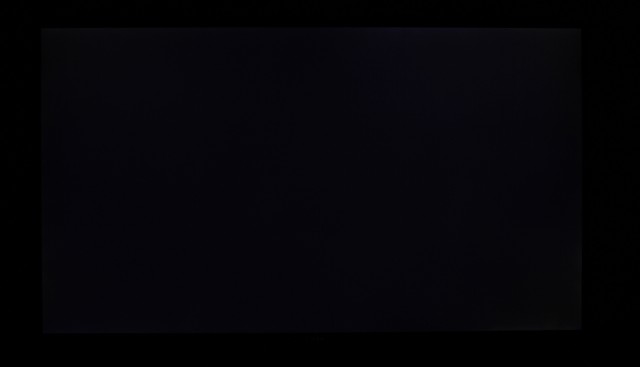
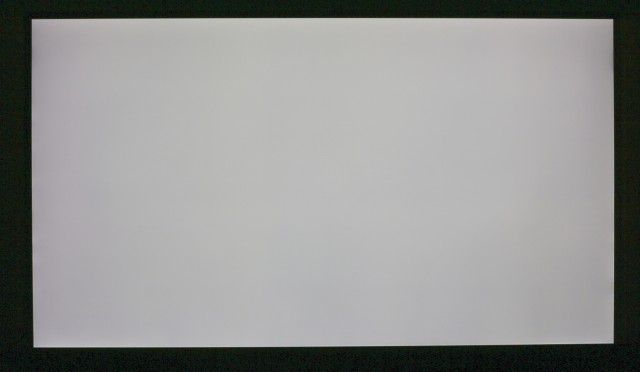
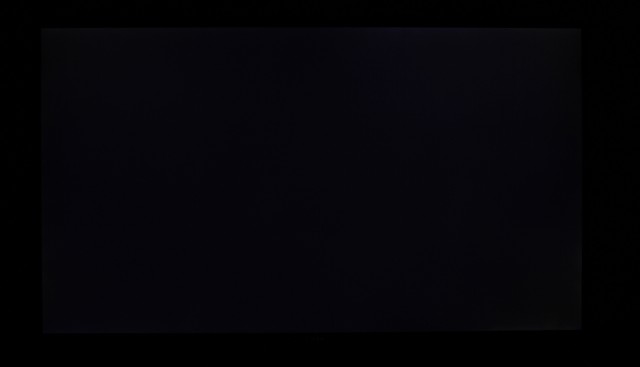
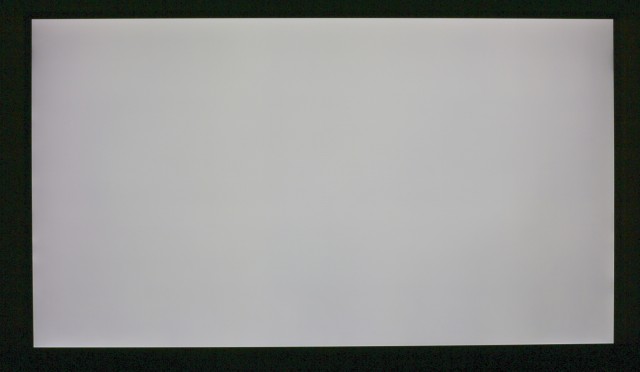
Given the large diagonal of the TV, we expected to see at least slight backlight leakage around the perimeter on a black background, but there was none. Everything is also fine with the white background.
Matrix speed and PWM
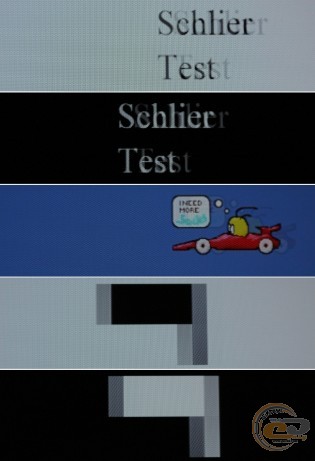
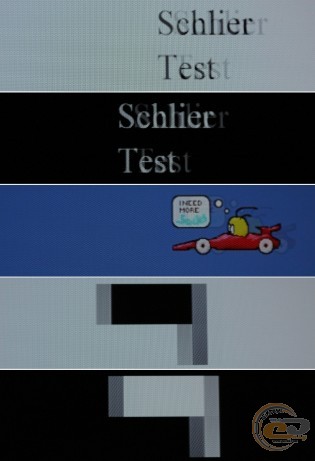
The 6-ms matrix is noticeable with short trails from moving objects, but they are only visible when shooting with special equipment. In reality, no problems with trails were observed, so the TV is suitable for dynamic games and watching blockbusters.
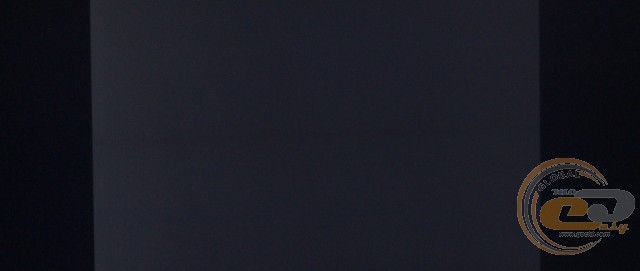
Brightness - 25%, exposure - 1/15
Another pleasant bonus is the absence of visible backlight flicker, as indicated by the single solid front in the image. This reduces eye strain and increases comfort during prolonged screen time.
Viewing Angles
The viewing angles of the Vinga E55UHD20B TV are not specified on the official website or on the box. Subjectively, they are quite wide: when viewed from sharp angles, the image does not fade, but darkening is observed. Although with a 55-inch diagonal, even a small group can comfortably gather around the screen.
Conclusions
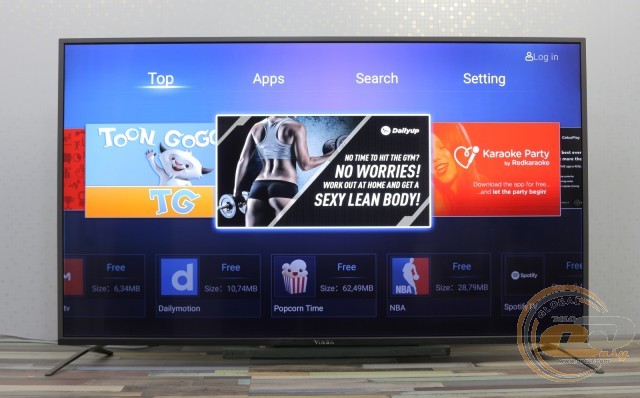
Time to draw conclusions. The 55-inch 4K TV Vinga E55UHD20B looks like a very attractive purchase due to its combination of elegant appearance, good functionality, and relatively affordable price.
It is equipped with a 2-core processor and 1.5 GB of RAM. It runs on Android 6.0 OS with access to the Google Play app store. Therefore, you can easily install the apps or simple games you need. Overall, the performance is at a low level, so playing heavy mobile games is not possible. But there will be no problems with watching videos and casual projects.
If you connect quality acoustics, the Vinga E55UHD20B turns into a home theater. And with the help of a PC, you can run Windows games on it. There is even Miracast support for streaming video from compatible smartphones and tablets.
However, the quality of panel calibration did not impress. Yes, the Edge LED backlight performs its duties well, there are decent indicators of static contrast and color coverage. But the TV cannot boast of accurate shade reproduction, gamma curve settings, and RGB profiles. Manual calibration improves the situation. But it is still advisable to evaluate the picture quality yourself before purchasing. Considering the price positioning, we had no complaints, but this is individual.
Overall, the Vinga E55UHD20B TV deserves your attention as a multimedia entertainment processing center, but like any other product available in its segment, it has its strengths and weaknesses.
Advantages:
- 55-inch panel with 4K resolution and Edge LED backlighting;
- Smart TV support;
- built-in Wi-Fi module and Ethernet port;
- attractive and functionally thoughtful body design;
- easy-to-use remote control;
- expanded set of external interfaces;
- ability to play multimedia content from an external USB drive;
- support for digital television;
- convenient interface orientation for wall mounting;
- pair of built-in speakers with a total power of 16 W;
- functional menu with Ukrainian and Russian language localization;
- pre-installed Android 6.0 OS with access to Play Market and the ability to install apps or games;
- wide viewing angles;
- good response speed;
- good brightness range;
- support for wall mounting.
Disadvantages:
- not very good factory calibration.
Author: Serhiy Budilovskyi
Translation: Liliya Masyuk