Hello to all readers.
As of today, the computer components market is growing at an unprecedented speed, and sometimes choosing something suitable can be a challenging task. Moreover, when it comes to gaming sets, where the components are not only powerful but also aesthetically pleasing, there may be an issue with selecting a case that best highlights this individuality. To the delight of those who have already faced this problem, the company Vinga offers a rather unconventional approach to solving it - a case with a very fitting name, Limpid.
Background
Since the moment a computer entered my life, it has never been just a set of hardware for me; I paid a lot of attention to what components were inside and how they were presented externally. And if there were usually no issues with the former, the question of the case often boiled down to choosing between a gray or black box. It was then that I got into the modding movement, adding a bit of LED paint to my rather boring white case. Later, during an upgrade, a black knight appeared, flaunting button backlighting and an LED display with information about fan speeds and temperatures inside the case. However, light modifications did not bypass it either. But I understood that this could not last long.
That's when I discovered my love for unconventional cases. Unfortunately, local stores did not offer any visible variety in this direction: 90% of cases differed only in the shape of the front panel, the presence of fans, and lighting. But they still remained gloomy parallelepipeds with standard layouts. I wanted something unusual. After extensive searches on Google, I had ideas to make it myself, for example, from acrylic, aluminum, and wood, or Lego. Particularly sophisticated options included embedding parts of all components into household objects, such as bread bins, old cabinets, or tabletops. But I also understood that all these options had no chance of realization because their implementation required considerable expenses and appropriate tools, which I did not have.
A second wind in this direction opened up after a more open orientation of worthy computer component manufacturers for gamers. Many new models entered the market, of various shapes and colors, some of which resembled spaceships or something from the realm of fantasy. I started to come across interesting case options more often, which I even considered as a replacement for my old one. I felt that soon a truly cool option would be found.
I was not mistaken. Some time ago, many new, very impressive Mid Tower cases appeared on the Vinga website, which immediately won my sympathy. And when I was already preparing to take one of them for review (Hydra RGB), another novelty was released, which became a real game-changer. I realized at that moment that this was the one I wanted to try out. It was Limpid.
As soon as I had some free time, I agreed with Vinga representatives on all the details and, after clarifying the technical nuances, picked up the case from the warehouse.
First Impressions
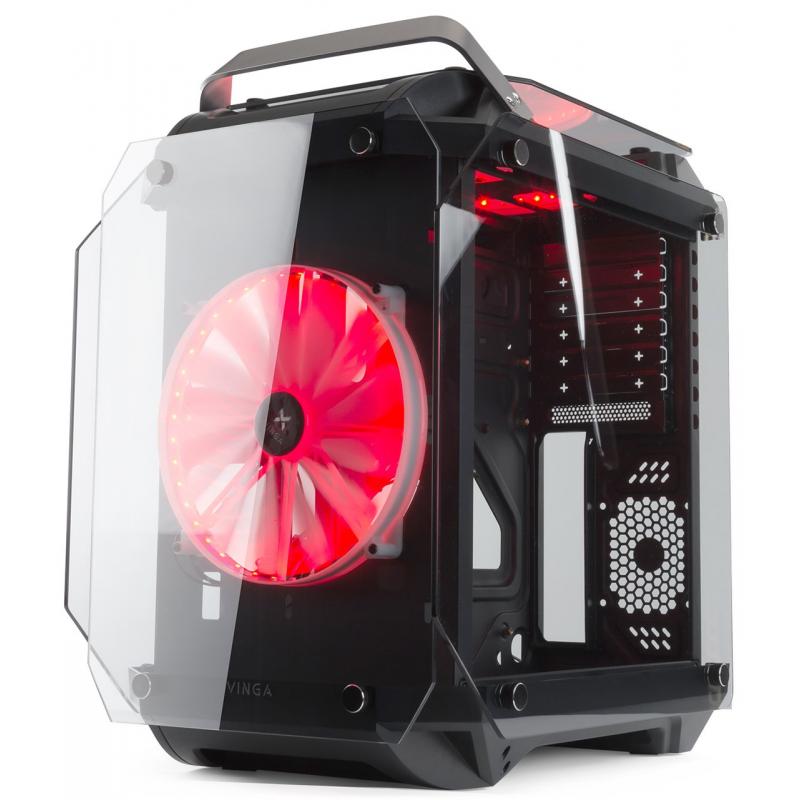
Inside the voluminous box, kept in a "monochrome" color, was, surprisingly, the Vinga Limpid case, carefully wrapped in a bag similar to those used for packing expensive shoes. The bag was placed inside a layer of foam. After unpacking everything, I took the case by the handle at the front (immediate karma points :)) and examined it. The first impression - it's magnificent: the duo of black faceted chassis, tinted glass, and wide screw heads created a sense of monumentality. In fact, the case turned out to be even smaller than I expected. And on the box itself, I found the following note: Warranty - 1 year, manufacturing date - 09 2017, service life - 15 years. Very interesting.
Package Contents and Technical Specifications
The package includes only the case, no power supply is provided. Inside the case, there is only the bare minimum - a set of screws for the motherboard and components, a spare stand, five cable ties, and a lighting controller with a remote control. Compared to other tower cases from Vinga, this set is a bit more modest. However, it is sufficient for installing everything that the design provides for.
| Specifications (official data) | |
| Form Factor | Mini-Tower (Cube Case) |
| Installation Method | Vertical |
| Supported Motherboards | ATX, MicroATX |
| Number of Expansion Slots | 7 |
| Number and Size of Installed Fans | 2 x 200 mm |
| Spaces for Additional Fans | Front 1x12/24 cm, Back 1x8 cm |
| Spaces for Installing Liquid Cooling System | Front 1x24 cm |
| Cooling Elements | Ventilation Grilles |
| External Ports | 2 x USB 2.0, 1 x USB 3.0, 2 x Audio (Microphone, Headphones) |
| Maximum Length of Graphics Cards | Up to 290 mm |
| Maximum Height of CPU Cooler | 16 cm |
| Presence of Lighting | Fans with Lighting |
| Case Material | Metal 0.5 mm, Plastic |
| Dimensions, mm | 370 x 280 x 460 mm |
| Weight, kg | 7.3 |
| Fan Specifications | |
| Bearing Type | Rifle Bearing |
| Rated Voltage | 12 V |
| Rated Input Power | 3.6 W |
| Rotation Speed | 600 RPM 土 10% |
| Maximum Airflow | 33 CFM (ft3/min) |
| Maximum Static Pressure | 0.82 mm-H2O |
| Noise | ≤23.5 dB(A) |
| Wire | PH6P, length - 610 mm |
Appearance
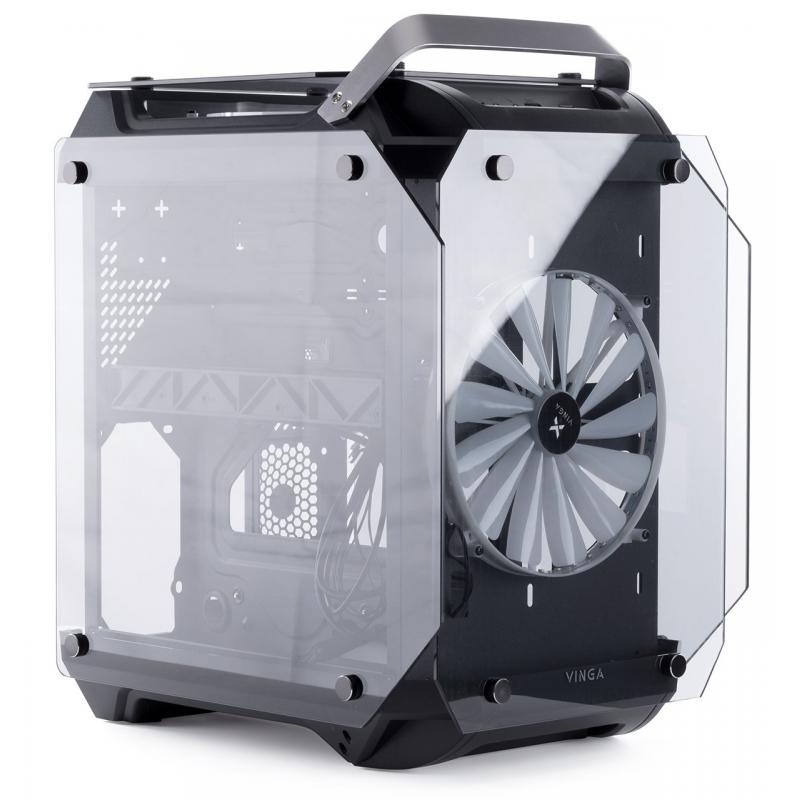
As I mentioned above, the case looks very cool. The first thing that catches the eye is the huge 20-centimeter fans on the front and top sides, as well as the tinted glass around the perimeter. The sharp edges of the black chassis and the matte metal handle for carrying at the front enhance the feeling that you are looking at an object of modern hi-tech architecture, as it strongly resembles the Premier Palace Hotel in Kharkiv or Marina Bay Sands in Singapore. In English, Limpid means transparent, clear. Looking at the case, you understand that the name was chosen very accurately.
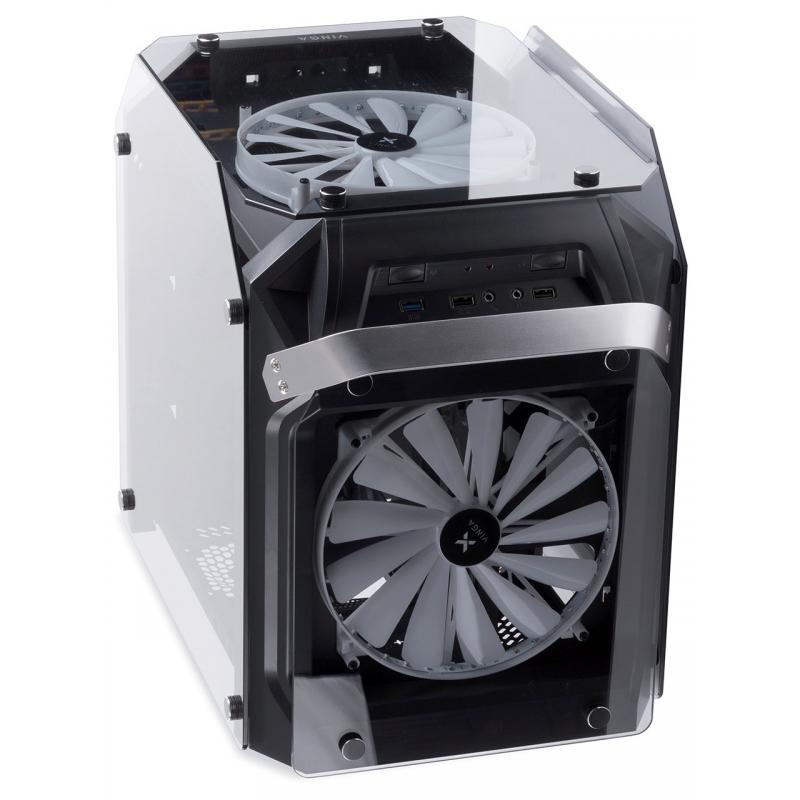
The tinted panels are made of 3.5 mm thick tempered glass, attached to the case with screws. The screws have wide heads and knurling around the edges for easy grip with fingers. The mounting points are rubberized, and the glass itself has recesses for more secure fixation. The side panels extend approximately 1.5 cm beyond the dimensions of the case, creating the impression that the front part is slightly recessed inward. Paired with the beveled edges, this creates an interesting visual effect.
It is also worth noting that the case is not "airtight": the structural elements at the bottom and top of the chassis are wider than the internal frame, so the glass panels are somewhat like a showcase. This is both good and bad. Good for better air circulation, bad because of dust and foreign small objects getting inside. On the other hand, such a case makes you want to keep it clean and tidy, so such design tricks can be a stimulus for greater self-organization. Moreover, dust cleaning is a simple and quick process.
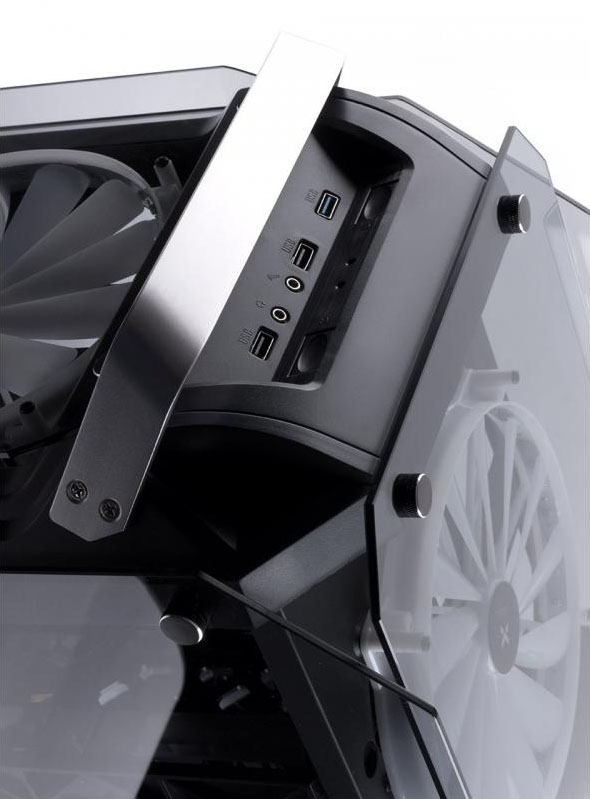
In a small recess at the top, the power and reset buttons are combined with power and HDD activity LEDs, two USB 2.0, one USB 3.0, headphone and microphone jacks. This arrangement is extremely convenient in my case because the case itself is on the floor, and this part is just within arm's reach. This allows you to connect removable media and audio devices as conveniently as possible, as well as read information from the LEDs in a second.
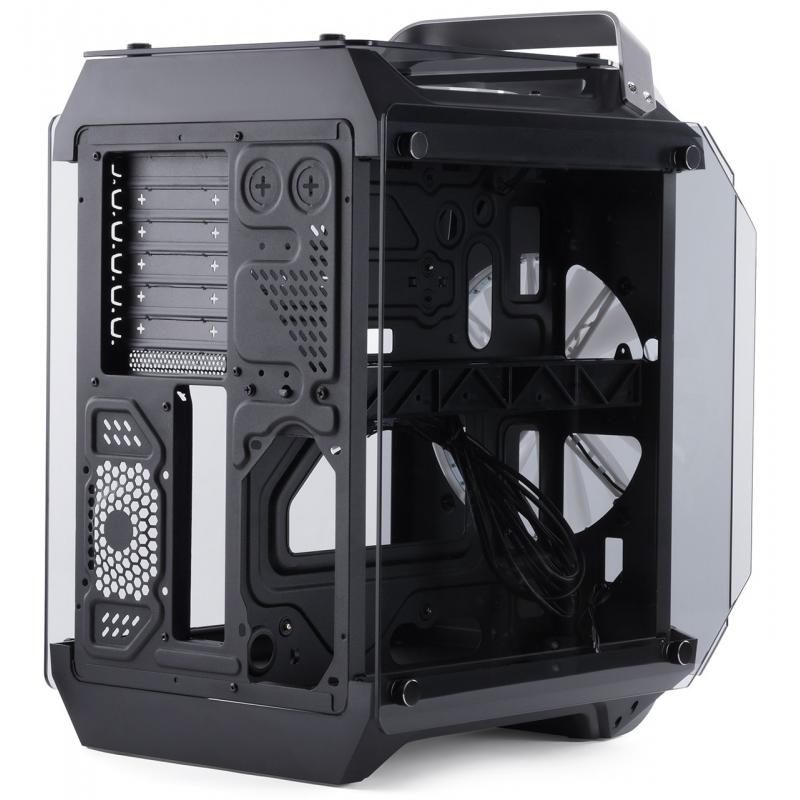
The back side has no surprises - a place for the motherboard I/O shield, ventilation holes with the possibility of installing an 8 cm exhaust fan, PCI device slots, and a place for the power supply unit.
Internal Layout
So far, I have not focused on the fact that this case has a cube form factor. Compared to a regular one, Limpid is shorter and wider. To make the most of this width, the case is divided into two parts. One houses the motherboard, and the other - the power supply and all peripherals. At the same time, if you look at the case from the front, the motherboard compartment is on the right, which is also a bit unusual. There are many technological holes in the "motherboard" partition for cable routing. By the way, besides the form factor, another interesting thing about the case is that the motherboard is installed upside down, meaning the processor with cooling is at the bottom, and the graphics card and expansion slots are at the top. I found this arrangement more interesting than the standard one, as the processor will have a bit easier "breathing" because cold air cannot defy the laws of physics. And the graphics card will be better cooled by the top fan.
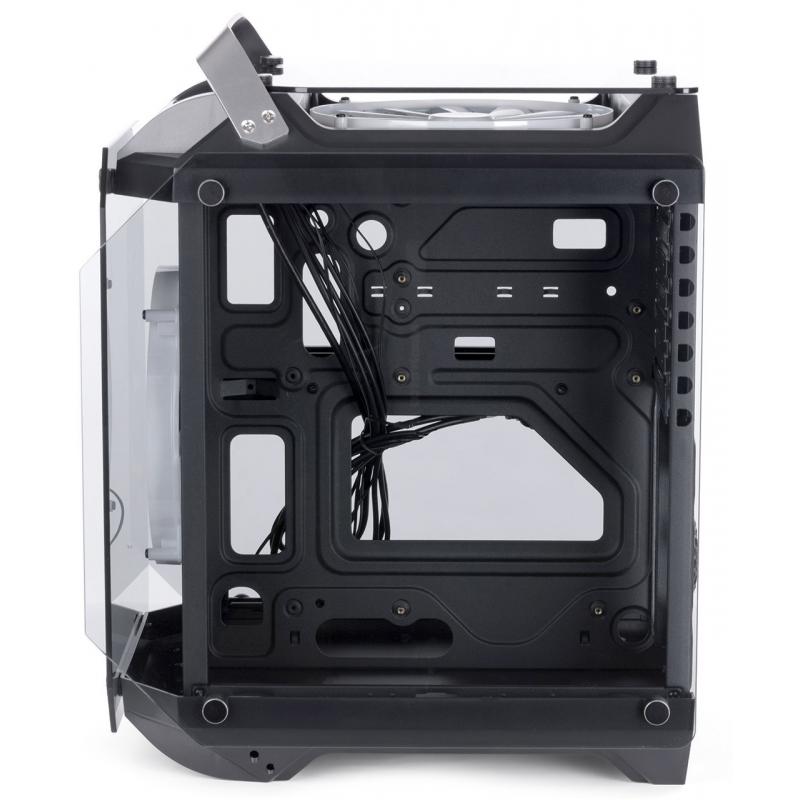
Graphics cards up to 290 mm long will fit in the Limpid. Although, if you believe the reviews, you can squeeze in longer cards, for example, a GTX 980 with a length of 309 mm (although according to official specifications, its length is 10.5 inches ~ 267 mm).
The motherboard compartment is suitable for ATX, MicroATX, and Mini-ITX boards. The maximum size is 30.5 x 30.5 cm. As for the cooling system for the processor, the official data indicates a maximum allowable height of 16 cm. In practice, the figures are slightly smaller: my DeepCool Iceedge 400 XT cooler is 12.7 cm high, and the distance to the glass remains more than 2 cm. So when choosing cooling, you should be attentive.
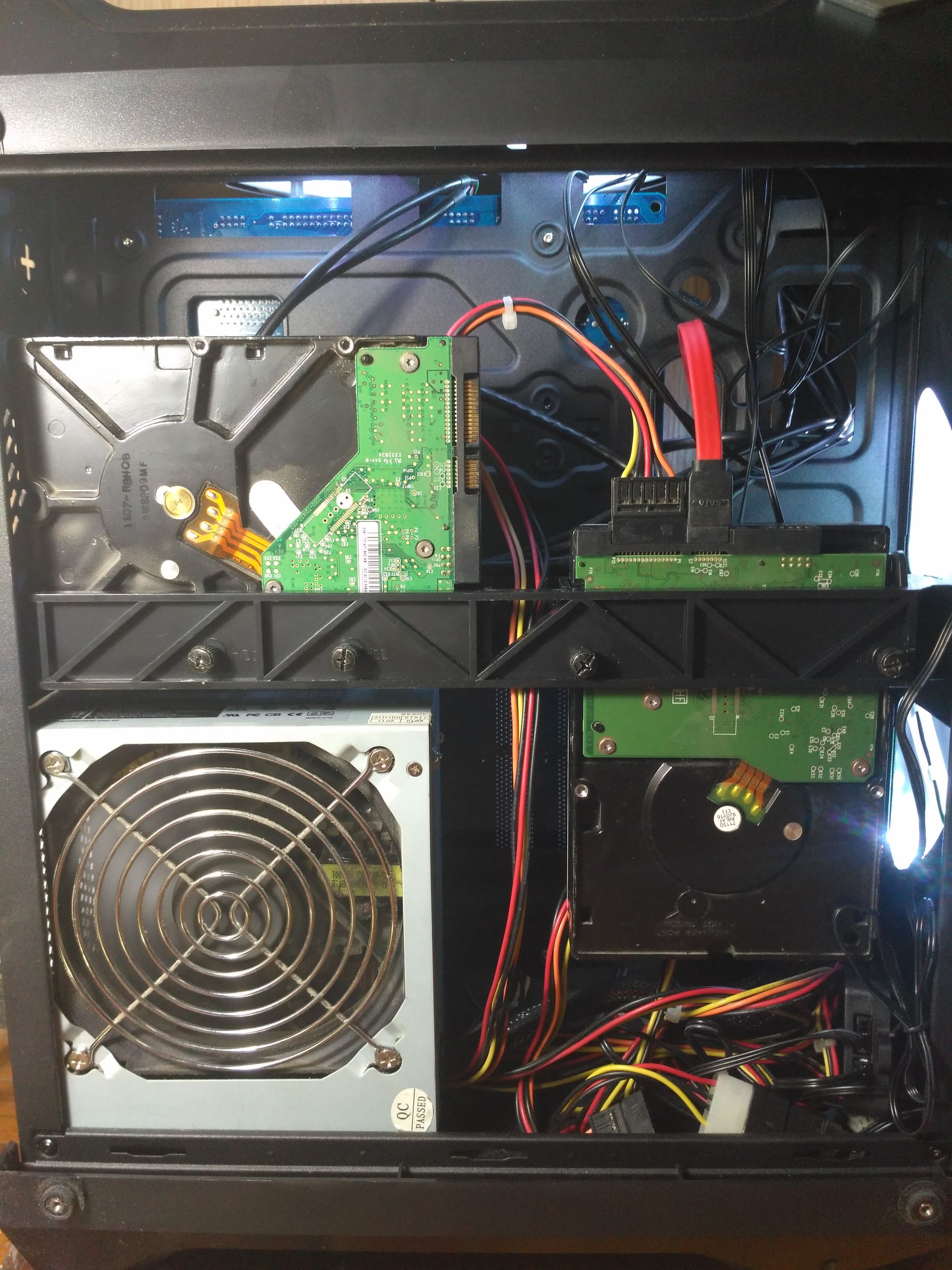
The peripheral compartment is also divided into two parts: the upper part is allocated for HDD and SSD drives, which are mounted in cells on a special ... um ... plastic stand, and the lower part houses the power supply unit.
Installing an HDD takes a few minutes, and with special screws, you don't even need a screwdriver. Unfortunately, the stand is designed to hold only two hard drives: one longitudinally and one transversely. Of course, you can improvise and try to squeeze a third hard drive into the free space, but you can also replace two hard drives with one with a larger capacity or use NAS. For SSD drives, there are two compartments in the upper part above the power supply unit. The only thing I slightly missed was the ability to install hard drives along with the cooling system. However, the power of the top fan should be sufficient to supply enough air for proper cooling of the components.
The lower part of the peripheral compartment can accommodate a power supply unit of any length. The most "extravagant" units at 18 cm (the maximum length of all currently available for sale) can fit in the compartment without the need to remove the "hanging" hard drive. Even in such a configuration, there should be no problem with cable routing.
Technical Features
I specifically put this in a separate section to describe it in more detail, considering everything mentioned above. As I have already noted, the case has a non-standard form factor and internal layout with an inverted motherboard located on the right, not on the left, as in most (or even all) standard system units. So ... To return to the usual layout, the case needs to be ... flipped! Yes, flipped!
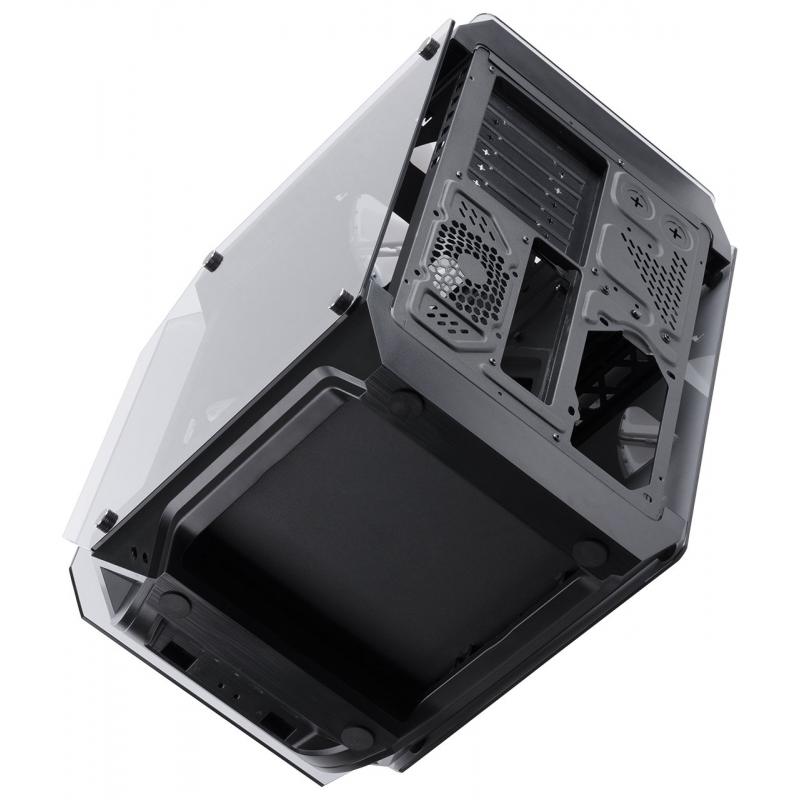
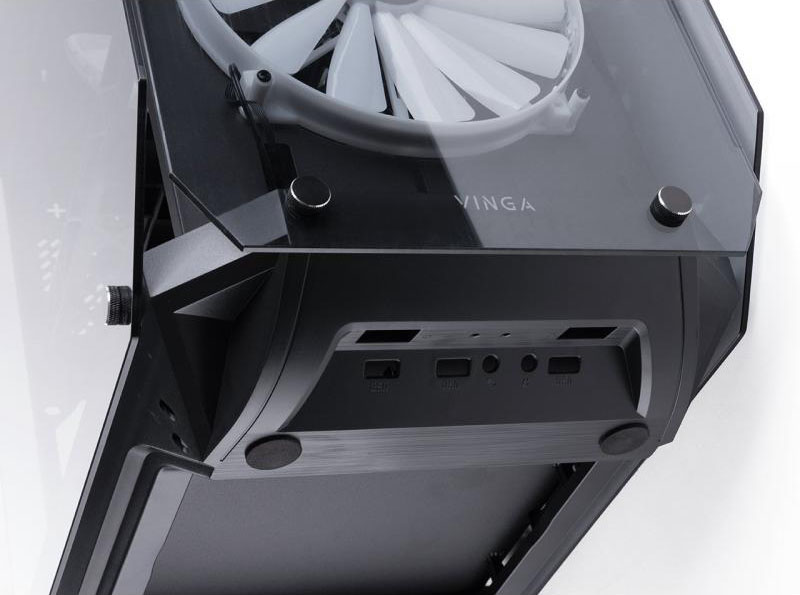
Vinga Limpid has a symmetrical design of the top and bottom parts, so all computer conservatives and pedants can easily transform it into a quite ordinary system unit. In this position, it can already function, but for greater convenience, you can also swap the top and bottom plastic covers, reattach the metal carrying handle and the controller with USB and audio connectors to the "reverse" side, as well as the glass on the front panel. This feature makes the case versatile, now you don't have to worry about it standing "the wrong way," complicating access to some internal components. But, as I said, I prefer the initial layout with the bottom-mounted power supply and inverted motherboard.
Connection and First Start
After the preliminary study, it was time for assembly and connection. My biggest doubts were whether my motherboard on the 775 socket would fit the mounts. After removing it from the "old" case, I installed it in the Limpid and checked the mounting holes: everything fit. Two standoffs had to be re-screwed, after which the motherboard fit like a glove. The only point is that the standoffs need to be screwed tightly, otherwise, when unscrewing the motherboard screws, the standoffs will unscrew with them, and putting them back in place is a bit inconvenient.

After connecting the signal wires (which I call power, reset, LEDs, etc.) and peripherals, I pressed the power button. After a few seconds of silence, the BIOS began to beep intermittently and after 9 beeps went into reboot. Then it all repeated again. After spending most of the evening figuring out the reasons, while reconnecting the signal wires and peripherals, I finally reached a point of no return, where nothing helped, and I removed the CMOS battery. After a short break, I put everything back and turned on the power again. The BIOS beeped once, and the POST check lines ran on the screen, followed by the Windows 8.1 boot screen. HURRAY! The moral of this story is that a lot of time was spent trying to find the correct combination of connected peripherals and signal wires because I wasn't sure if the latter were connected correctly. If they had proper labeling (the current version suffers from poor readability) or at least a different color for the "positive" wire, the malfunction would have been found much faster.
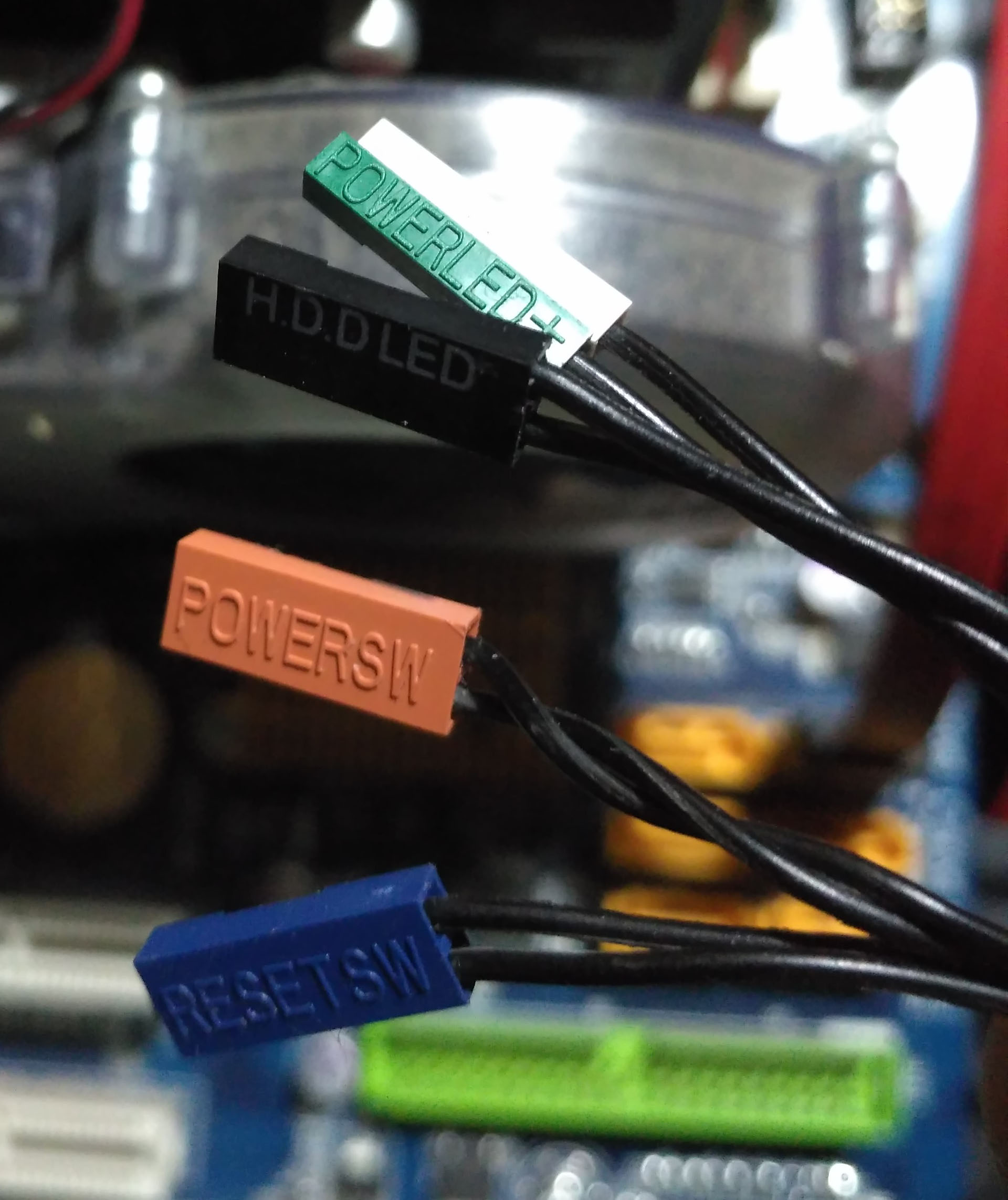
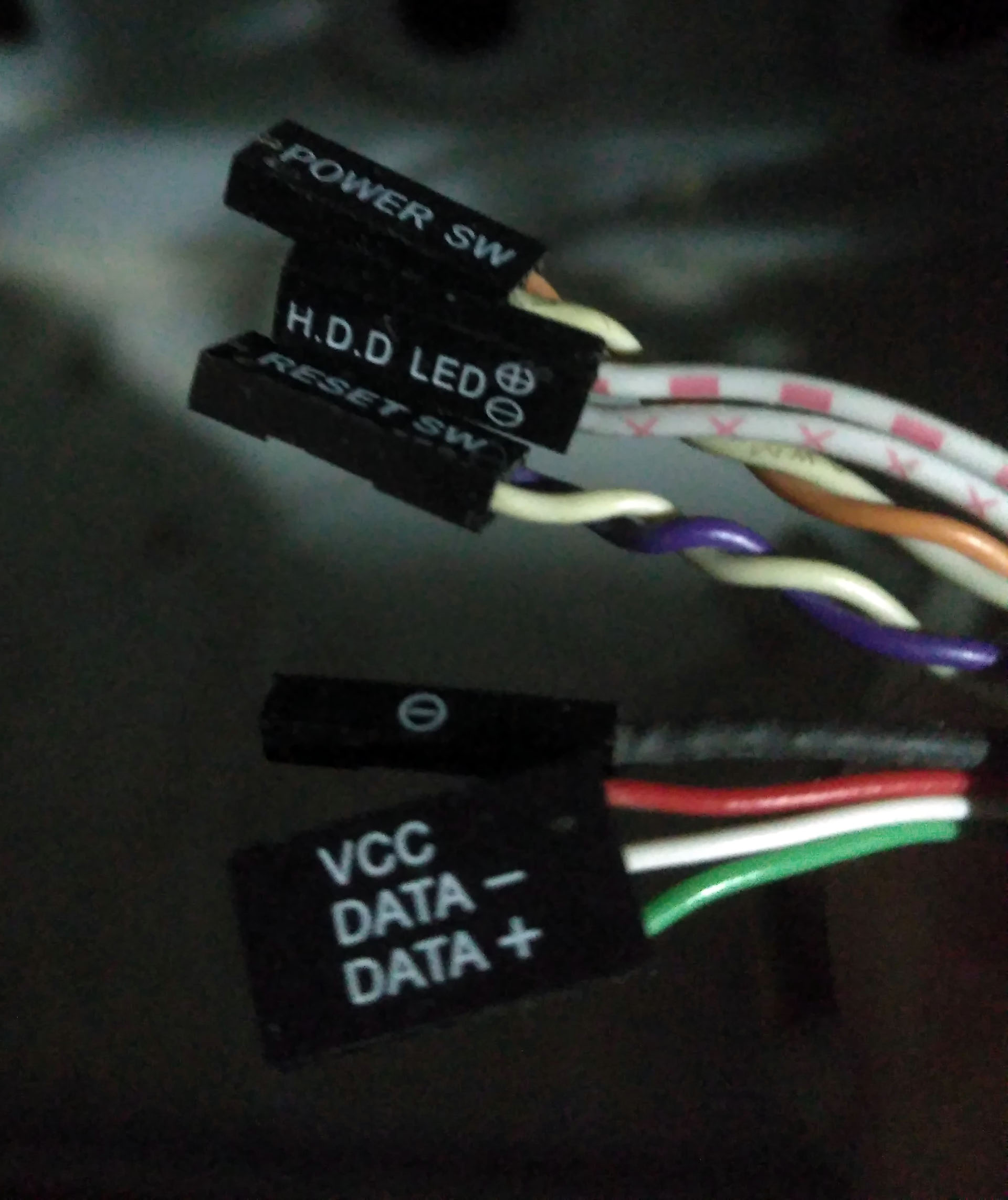
As I said, two options would have been suitable here: a colored "positive" wire or contrasting labeling of the connectors/different colored wires.
When the system stabilized and computer activities began, I found myself periodically listening to the computer's operation. Until now, this wasn't a problem because I could hear what was happening, but now I had to strain my ears. Despite two large fans and the lack of "airtightness," Limpid turned out to be quiet. Even in complete silence at night, I only heard a slight unobtrusive rustle. Out of curiosity, I even conducted some measurements in normal mode and during a stress test. The results were as follows:
Volume
| Volume, dB | Normal Mode | Stress Test |
| Minimum | 60 | 59 |
| Average | 64 | 72 |
| Maximum | 77 | 77 |
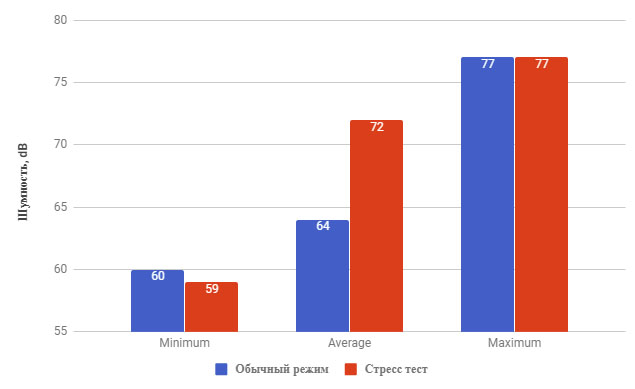
Noise measurements were conducted using the Sound Meter mobile app for 30 minutes. The phone was placed in close proximity to the "motherboard" partition.
Stress Test
| Temperature, °C | Normal Mode | Stress Test |
| inside the case | 23/26 | 28 |
| Motherboard | 34 | 34 |
| CPU | 26 | 43 |
| CPU Core #1 | 48 | 65 |
| CPU Core #2 | 44 | 58 |
| CPU Core #3 | 45 | 59 |
| CPU Core #4 | 46 |
62 |
| GPU | 41 |
42 |
| HDD | 33 |
35 |
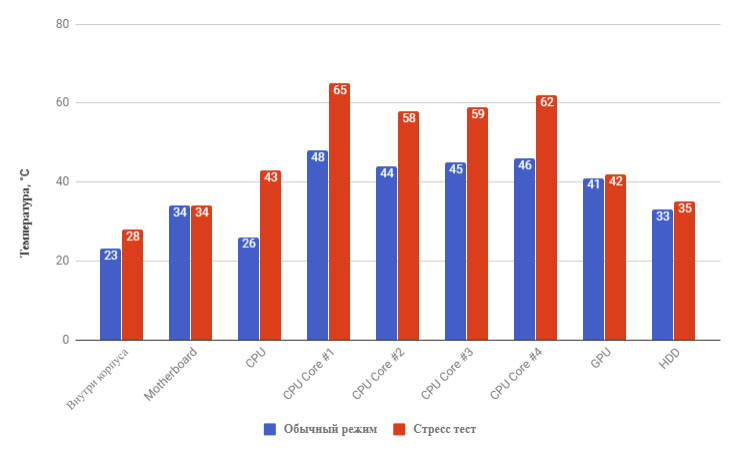
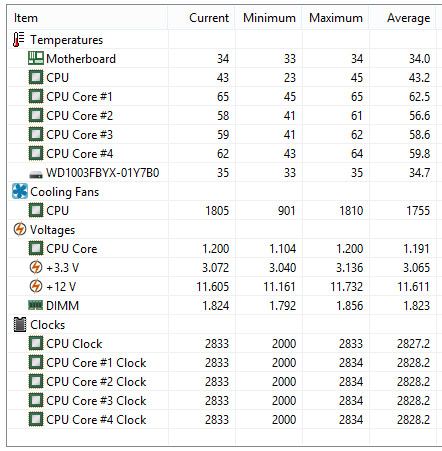
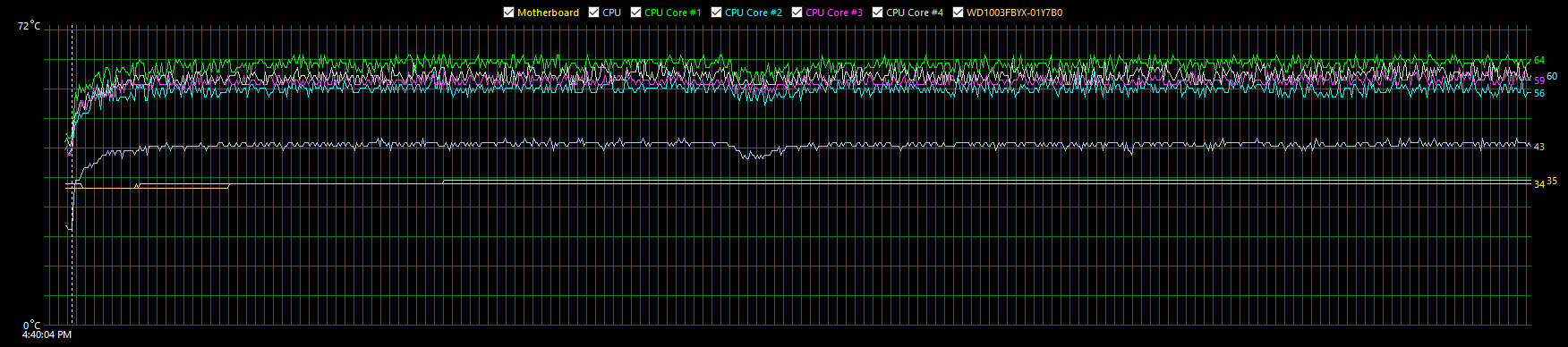
In the screenshots above, you can notice 5 entries about CPU temperature. For those who don't know, 4 of them correspond to each core separately, and one corresponds to the temperature at the center of the processor's heat spreader. As you can see, its reading is lower, indicating effective heat dissipation from it using thermal paste (apparently, there's still enough of it) and the DeepCool IceEdge 400XT.
| Fan Speed | Normal Mode | Stress Test |
| processor | 878 | 1810 |
| graphics card | 44% | 46% |
The stress test was conducted for 1 hour 19 minutes and 22 seconds using the AIDA64 Extreme application with all possible stress testing options selected.
The test clearly showed that the case is well-ventilated and the heating of components can hardly be called serious. The processor fan had a reserve of 400 RPM or about 20%, while the graphics card cooler didn't spin more than 46%. Recalling the indicators on my "old" case, the motherboard heated up more (38 °C and above), the graphics card (sometimes reaching 65-70 °C), and the hard drive (up to 37-38 °C). Therefore, with a high degree of confidence, it can be said that the inverted layout is good, the graphics card in close proximity to the fan is good (thank you, captain :)), a separate compartment for peripherals is good.
Returning to the question of silence, I note that the structural features of the fans with quieter and more durable bearings play a significant role here. Even without measurements, if you believe the official data, less than 23.5 dB is a very decent indicator. And everything would be fine if not for my hard drives, which work like the engine of a mainline tractor, thus creating high peak noise values (77 dB) when they are accessed for a long time. But, this is not critical.
By the way, the case can be made even quieter and cooler by installing a radiator of a liquid cooling system (LCS) up to 240 mm in size instead of the front fan. Mounting holes for it are provided along the right edge of the front panel.
Overall, both in working mode and under high loads, Limpid left an extremely positive impression, and I had no reason to complain about anything.
Lighting
During the connection of all peripherals, inside the case, I noticed a device resembling a rheobus. In fact, it turned out to be an RGB LED controller. It had 6 connectors for connecting fans with lighting (similar to those installed) and 2 more 4-pin connectors for LED strips. After attaching the controller to the "motherboard" partition, connecting the wires from the fans to it, and bringing the sensor for the remote control to the front panel, I pressed the "ON" button on the remote control with bated breath... Oh, what a beauty!
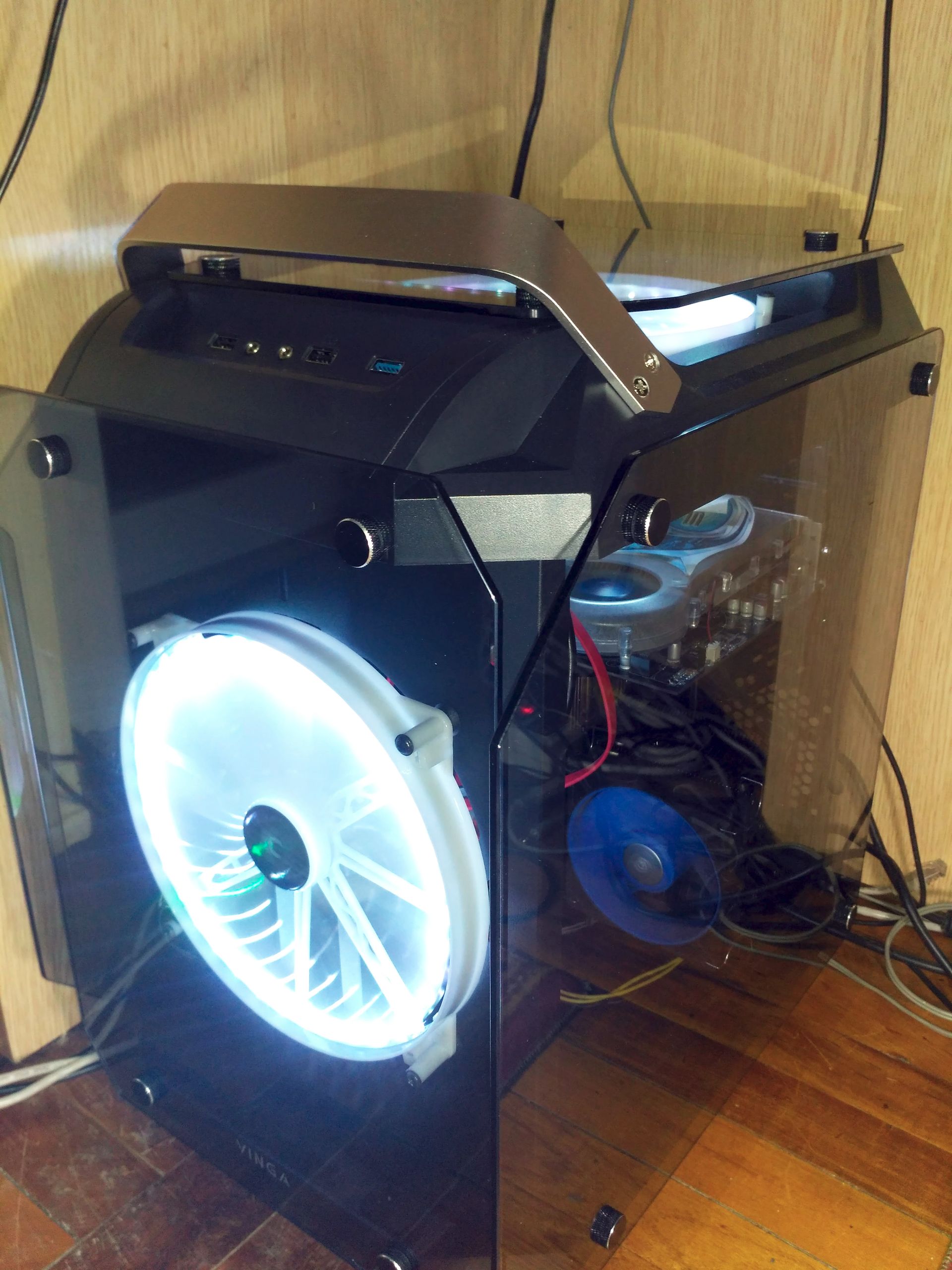
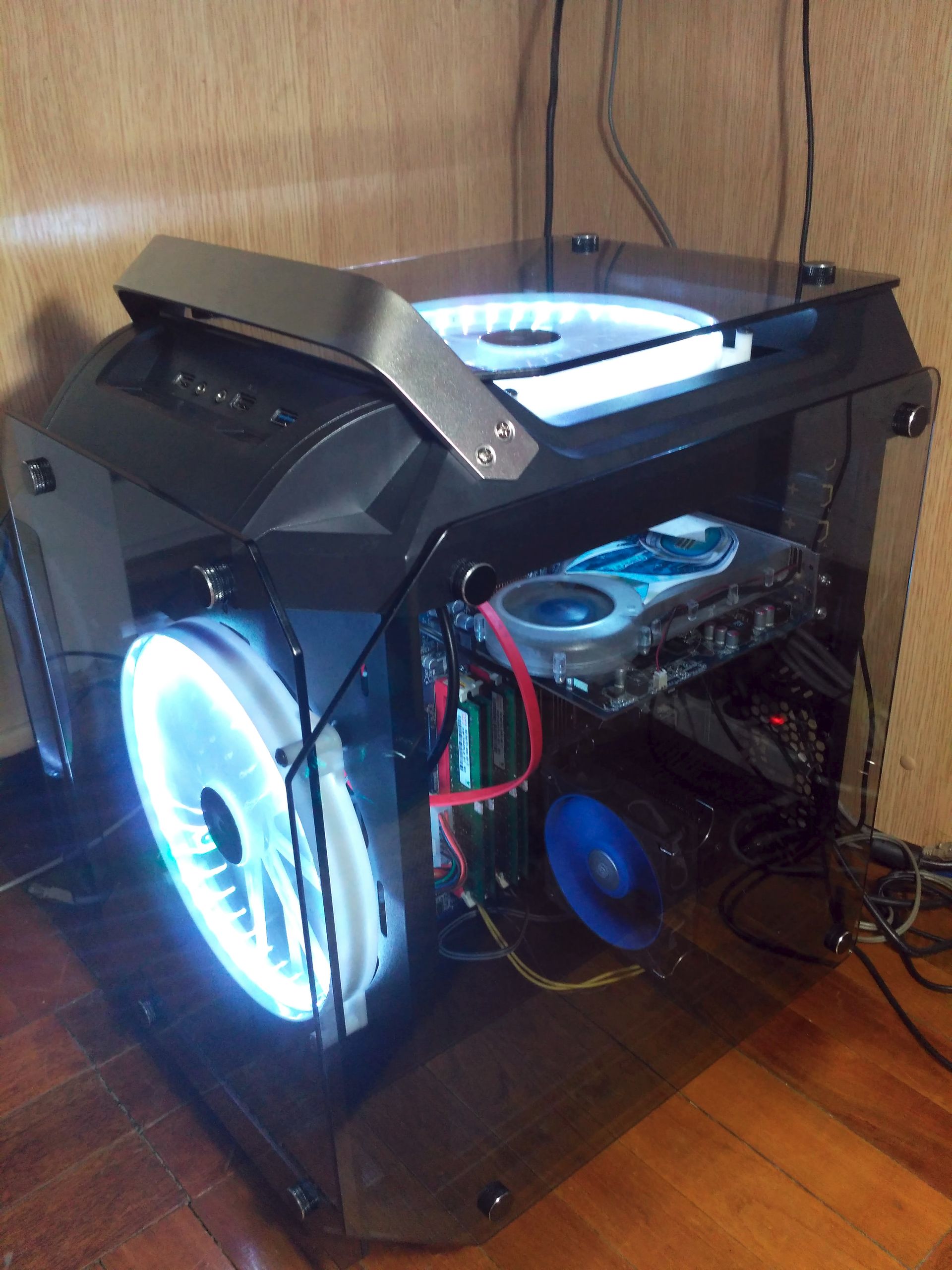

The LEDs located around the perimeter of the fans flooded the room with a stream of multicolored photons, causing a wave of puppy-like delight in me. In some modes, you can achieve a stroboscopic effect on the fans, which also adds to the lighting's effect.
The remote control is similar to those used in many LED strips. It allows you to set 3 basic RGB colors + white, as well as a 4-step gradient from red to orange, from green to blue, from blue to pink. In addition, there are 4 lighting modes: Flash (sharp color change), Strobe (smooth color and lighting intensity change), Fade (smooth transition from one color to another without changing lighting intensity), Smooth (sharp color change. No differences from Flash found). All modes can also be varied in brightness using two buttons. By the way, if you don't remove the blue protective film from the glass, the lighting colors are distorted, and it's also interesting to watch. For example, white becomes turquoise, and yellow becomes green.
https://dl.dropboxusercontent.com/s/gc385cggmiriucw/Vinga-Limpid-LED-test.mp4
Summary
So, what do we have in the end? The case is simply stunning and surprises from the first minute of acquaintance: first with its form factor, then with its glass "armor," inverted layout, and convenient carrying handle. The futuristic appearance and non-standard design, combined with the lighting, attract attention, and even when you're just sitting in a chair, thinking about something, you look at all this beauty and just smile. I liked the organization of the internal space and the option with the division of "influence" zones - it improves air circulation, reduces cable clutter, and also pleases the eye with aesthetic balance.
I was delighted with the cube form factor: the amazing view concealed convenience and practicality. I have long been attracted to such cases, and I wanted to try and evaluate whether they have a right to exist. As a result, I no longer want to return to gloomy Mid Tower boxes. Another plus of the cubic shape is that due to its width, it is very stable - it's almost impossible to rock it by accidentally hitting it with your foot or knee.
Limpid is quiet and cool. Both in the stress test and in heavy games, it performed excellently: the maximum I managed to "squeeze" out of the graphics card was 52 °C, while the cooler didn't even exceed 50% power. The processor was impossible to "upset," the cooler always accelerated at the right moment and reduced the temperature. And inside the case, at peak heat, it was +28 °C, which is also not very much.
From small "wants," I would note only one point: add color to the signal wires, and to prevent them from standing out against the black case, wrap them in a black mesh, which usually contains power supply wires. However, this is a trifle, it doesn't play any significant role in the overall assessment of the case.
Limpid is an absolute must-have for those tired of the gloomy grayness or darkness of Mid Tower cases, who are looking for an original way to stand out without making themselves look like a clown. The strictness of lines, a large amount of tinted glass, and lighting create a very balanced look that is unlikely to leave anyone indifferent.
I was very sorry to part with this case - it literally made me fall in love with its unconventional functionality and convenience, and it also provided a sense of aesthetic satisfaction throughout the time it was under testing.