There can be a long debate about what came first: a case with transparent walls or components with lighting. But in any case, both of these trends exist, and they are popular. In turn, Vinga tries not to lag behind modern trends by offering customers a variety of chassis options that combine metal, glass, acrylic, and RGB illumination. Over the past six months, we have tested many similar models, such as Vinga Gryphon, Hydra RGB, Polaris, and Limpid.
This time we got another variation on this theme - Vinga Barbarian. "Barbarian," as the name of the novelty can be translated, belongs to spacious mid-tower cases. For its $86, the user gets two transparent panels and seven pre-installed fans with LED lighting. Well, let's get acquainted with this case and evaluate the prospects of its purchase.
Specification
|
Model |
Vinga Barbarian |
|
|
Case Size |
Middle Tower |
|
|
Motherboard Form Factor Support |
ATX / Extended-ATX / microATX / Mini-ITX |
|
|
Color |
Black |
|
|
Internal Bays |
2 x 3.5” 3 x 2.5” |
|
|
Expansion Slots |
7 |
|
|
Maximum GPU Length (in brackets - own measurements) |
390 mm (390 mm) |
|
|
Maximum CPU Cooler Height (in brackets - own measurements) |
170 mm (163 mm) |
|
|
Maximum PSU Length (in brackets - own measurements) |
220 mm (240 mm) |
|
|
Ports |
1 x USB 3.0 2 x USB 2.0 2 x Audio Ports |
|
|
Pre-installed Fans |
Front Panel |
3 x 120-mm |
|
Rear Panel |
1 x 120-mm |
|
|
Top Panel |
2 x 120-mm |
|
|
Inner Partition |
1 x 120-mm |
|
|
Fan Installation Options |
Front Panel |
3 x 120-mm |
|
Rear Panel |
1 x 120-mm |
|
|
Top Panel |
2 x 120-mm / 140-mm |
|
|
Inner Partition |
2 x 120-mm |
|
|
Liquid Cooling Installation Options |
Front Panel |
1 x 120 mm / 240 mm / 280 mm / 360 mm |
|
Rear Panel |
1 x 120 mm |
|
|
Top Panel |
1 x 120 mm / 240 mm / 280 mm |
|
|
Power Supply |
None |
|
|
Materials |
Front Panel |
Tempered Glass 4 mm thick |
|
Chassis |
Steel 0.6 - 0.63 mm thick |
|
|
Right Side Panel |
Steel 0.62 mm thick |
|
|
Left Side Panel |
Acrylic 3 mm thick |
|
|
Case Dimensions (in brackets - own measurements) |
485 x 200 x 445 mm (484 x 206 x 459 mm) |
|
|
Weight (own measurements) |
5.939 kg |
|
|
Manufacturer's Website |
||
Packaging and Supply Kit
Vinga Barbarian is sealed in a standard cardboard box with monochrome design. On its sides, you can find several inaccurate schematic images of the case, the product name, and specifications in English and Ukrainian. They just forgot about handles for convenience during transportation.
The package includes the following accessories: sets of screws for mounting the motherboard, power supply, drives, and even liquid cooling radiators. In addition, the manufacturer included a hub for fans and a remote control for managing the lighting.
Appearance
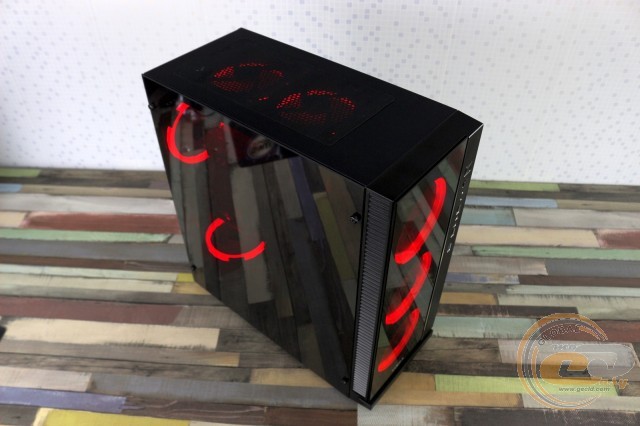
The design of the Vinga Barbarian is quite simple and straightforward. The steel rectangular chassis (0.6-0.62 mm) is complemented by an angular plastic frame with ventilation holes on the left side and slightly tinted front glass (4 mm). It's a bit strange that the ventilation holes are only on one side. It's unclear why perforation wasn't made around the entire perimeter, although it would probably improve the inflow of cool air inside. The decision is frankly controversial.
The right side of the front panel is designed as a plastic strip that well imitates brushed metal. It houses external ports and buttons. The set of elements is quite typical for this segment: a pair of USB 2.0 ports, one USB 3.0, and two 3.5 mm jacks for a microphone and headphones. Next to them are the power and reset buttons, as well as a pair of LED indicators.
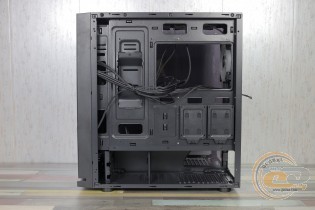
The front is quite easy to remove, as it is attached with a series of familiar clips. After its removal, the chassis is exposed. Meanwhile, it is visible that the standard 120 mm RGB fans are mounted directly on the wall (close to it), which prevents them from drawing air.
The top side of the Vinga Barbarian is steel. Closer to its rear part is a grille under which two more 120 mm RGB fans are hidden, protected from dust by a magnetic mesh filter. It is easy to remove for maintenance.
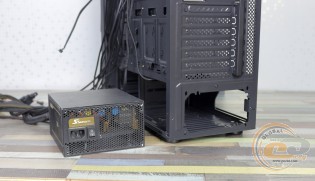
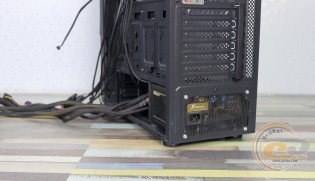
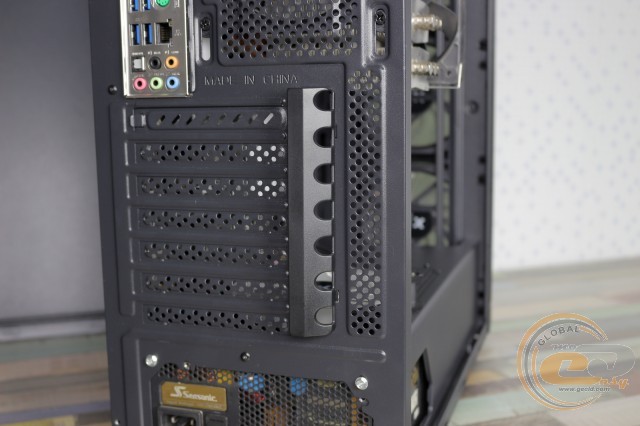
The rear part of the case is designed in a standard format. At the bottom, the power supply unit is attached with regular screws or with a knurled plastic head (included). Above are seven expansion slot covers, then a window for the motherboard's interface panel, and to the right of it, behind the exhaust grille, a 120 mm RGB fan. Thanks to vertical slots, the fan can be moved up or down, optimally adjusting it to the airflow of the tower CPU cooler.
At the bottom of the case, there is a ventilation hole with a dust filter designed to provide cold air access to the PSU.
The filter is easy to remove, blow out, and wash. There are two pairs of plastic feet with a height of 21 mm with thin rubber pads, providing good stability on various types of surfaces and sufficient airflow for the power supply.
The left side of the Vinga Barbarian is a transparent acrylic panel (401 x 472 mm) with a thickness of 3 mm. Thanks to this, you can admire the internal components. It is held by four metal screws with a knurled head, located at the corners. Under the cap on all mounting screws are soft stickers.
On the opposite side is a metal panel with a thickness of 0.62 mm. It is held by two screws with a plastic knurled head and equipped with a handle for easy removal.
As for the practicality of the materials used, although fingerprints remain on the black matte paint, they are barely noticeable and easily removed with improvised means. Acrylic and glass are quite smudgy, so they require appropriate care.
Internal Structure
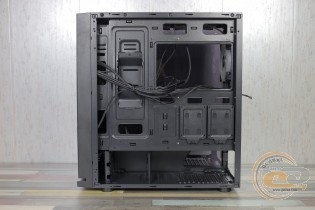
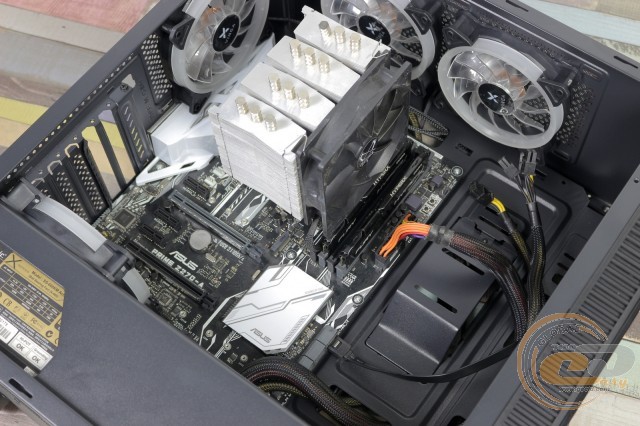
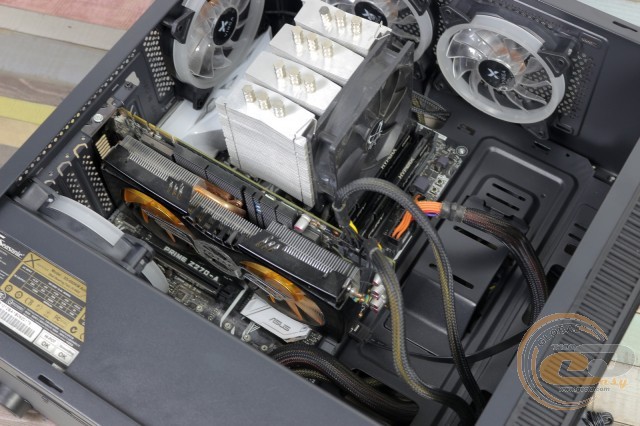
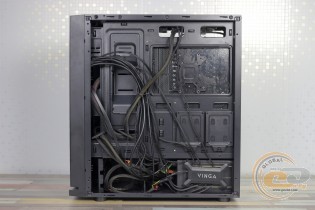
The Vinga Barbarian uses a layout with a bottom-mounted power supply. The latter, along with the drive cage, is separated from the main space by a metal shroud. The motherboard compartment is located on top. There are no racks in the front part, allowing for the installation of large components and improving the system's airflow due to the free circulation of air currents.
In the motherboard tray, there is a cutout that allows for the installation of CPU cooling systems with a backplate without removing the board itself. For cable management, there are several holes without silicone grommets but with tabs that secure the cables.
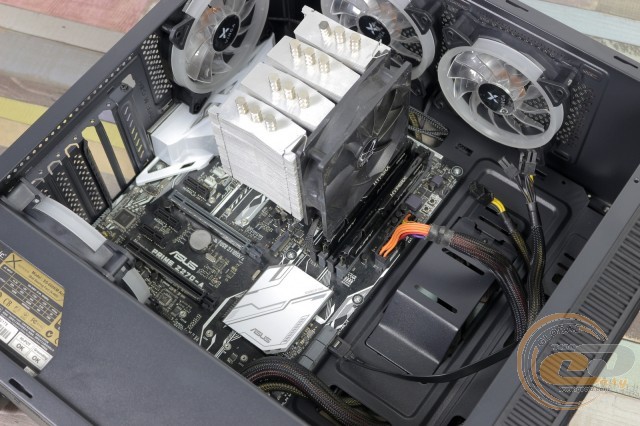
The chassis supports the installation of ATX, Extended-ATX (E-ATX), microATX, and Mini-ITX motherboards. Standard six-millimeter standoffs are used for this, which the manufacturer pre-installed according to the ATX specification.
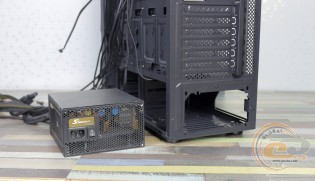
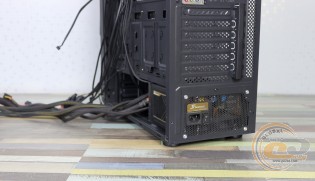
The power supply mounting area is not equipped with anti-vibration pads, and the attachment is done with the included screws. According to our measurements, the maximum PSU length is 240 mm.
In the Vinga Barbarian, you can simultaneously install up to five SSDs and HDDs: three 2.5-inch and two 3.5-inch. In the first case, two convenient trays are used behind the motherboard tray, as well as one spot under the ceiling in the transverse cage or on top of the partition (screw mounting). As for hard drives, to mount them, two flat-head screws need to be screwed in on the left side of the drive, then inserted into their place in the cage and secured on the right side with regular screws.
A special plate or bracket on the inner part of the motherboard tray deserves special attention. It can also be used to mount a drive or find another application for it.
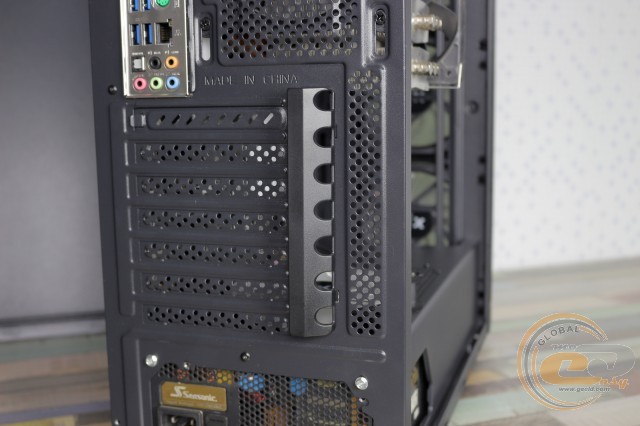
Six out of seven expansion slot covers are disposable. The tool-free mounting system is not provided - the manufacturer suggests using regular screws.
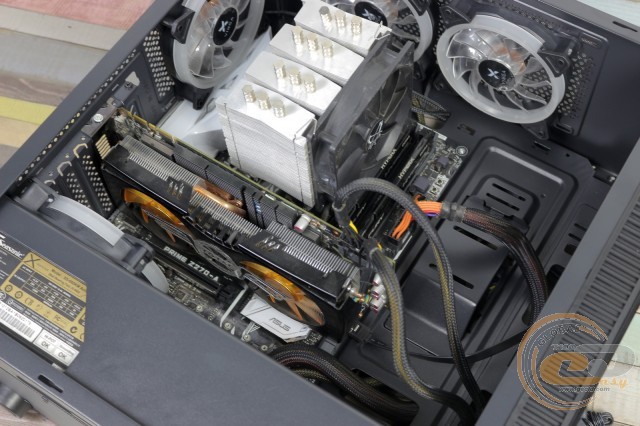
Without any tricks, the case can accommodate graphics cards up to 390 mm in length and CPU coolers up to 163 mm in height.
As mentioned earlier, the Vinga Barbarian has a total of seven 120 mm fans with LED lighting: three behind the front panel, two under the ceiling, and one each on the rear panel and partition. In all cases, the nominal rotation speed of their blades is 1200 RPM. On the top panel, they can be replaced with two 140 mm fans. Another 120 mm fan can fit on the partition. There is space in the front for a liquid cooling radiator up to 360 mm in length. A 280 mm liquid cooler can fit on top.
In addition to the listed features, note the presence of a hub for connecting eight 6-pin fans, as well as LED lighting control via a remote control. Thanks to two pairs of magnets, it is conveniently placed behind the motherboard tray. Power is supplied to the hub through a Molex (PATA) connector.
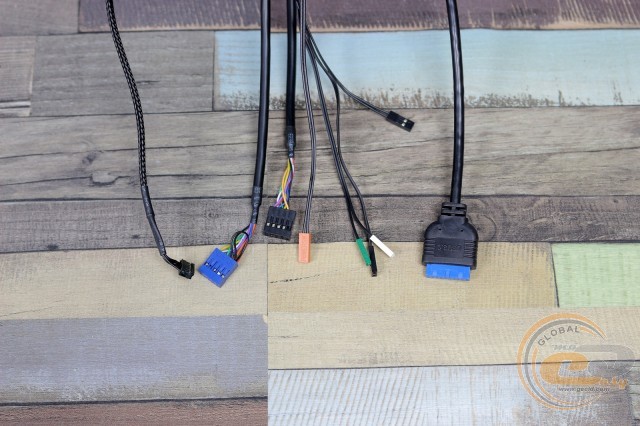
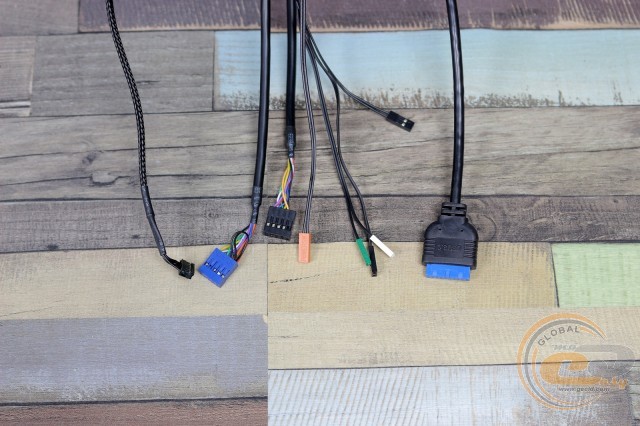
The cables coming from the front panel are long enough to be neatly routed to the motherboard.
|
Name |
Length, cm |
|
USB 2.0 |
70 |
|
USB 3.0 |
70 |
|
HD Audio |
70 |
|
Buttons and indicators |
65 |
|
From fans |
60 |
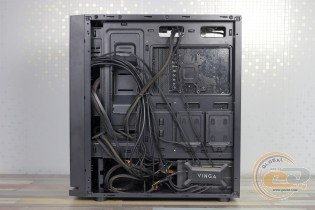
Assembling the system inside the Vinga Barbarian should not cause any difficulties. It is worth noting only the need to install the hard drive as the first component, if one is planned, because after mounting the PSU, it will be difficult to tighten the screws holding the drive. Otherwise, no remarks.
Thanks to the lighting of the included fans, the finished PC in the on state looks very bright and noticeable. The user has access to seven colors (red, green, blue, soft yellow, turquoise, purple, and white) and three operating modes (automatic color switching, fading, and flickering), the speed of which can be adjusted. At the same time, the remote control works easily from a distance of up to 5 meters.
Testing
|
Processor |
Intel Core i7-7700K (Socket LGA1151, 4.2 GHz, L3 8 MB) |
|
Cooler |
Scythe Mugen 3 |
|
Motherboard |
ASUS PRIME Z270-A (ATX, Socket LGA1151) |
|
RAM |
2 x 4 GB DDR4-2400 HyperX Fury (HX424C15FBK2/16) |
|
Video card |
ASUS GeForce GTX 980 MATRIX PLATINUM 4GB GDDR5 |
|
SSD |
SSD KINGMAX SME35 HYPERLINK |
|
Power supply |
GIGABYTE GP-P650B |
|
Thermal paste |
Noctua NT-H1 |
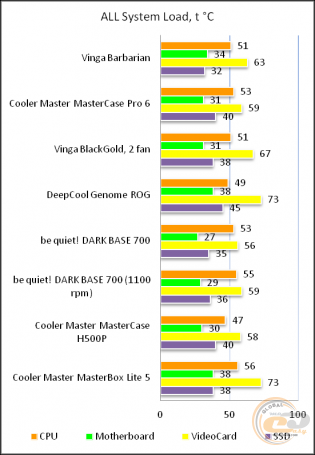
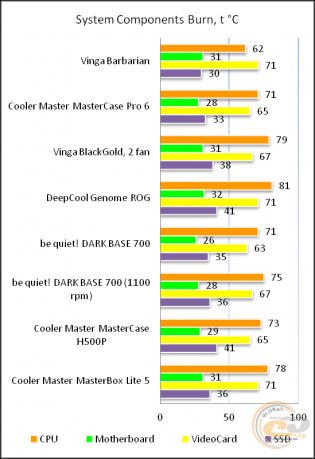
The Vinga Barbarian case was tested in a standard configuration, i.e., with seven installed fans running at 1200 RPM.
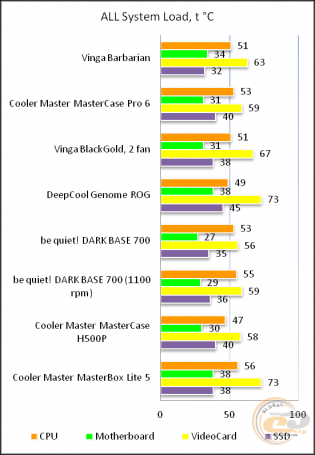
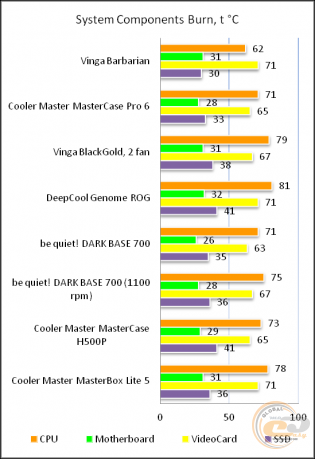
The "All System Load" chart shows the heating of components after 30 minutes of 3DMark Fire Strike in Ultra mode (4K resolution). The "System Component Burn" mode demonstrates temperatures under load with AIDA64 applications (Stress CPU and FPU) and MSI Kombustor for 15 minutes.
Even though the three front fans have virtually nowhere to draw cool air, the Vinga Barbarian case shows very decent results. Not record-breaking, but it doesn't fall "face down in the dirt" even against much more expensive and renowned competitors. True, the latter can still install additional fans and improve the situation, whereas here this is practically the maximum. As for acoustic comfort, we had no complaints.
Conclusions
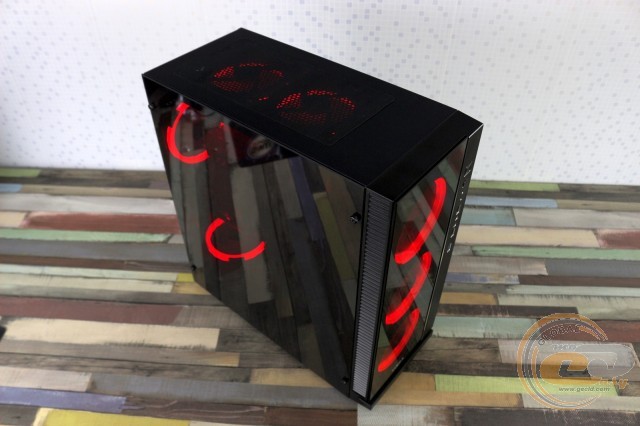
Vinga Barbarian is a case for those users who follow fashion trends and want to assemble a fairly powerful and bright PC in every sense. For this, the novelty offers semi-transparent viewing windows and a total of seven fans with LED lighting that will fill your room with light, which will not go unnoticed by others. A hub and remote control are included for their management.
Inside the case, there is room for the most bulky components, and the assembly process itself raises no questions. We were only disappointed by the weak efficiency of the fans on the front panel, as they simply have nowhere to draw cool air. And only due to the large number of installed fans do we have very decent temperature indicators for components with high heat dissipation. But the overall efficiency of the seven fans would be higher, provided there was sufficient airflow to the front fans.
Overall, the Vinga Barbarian was clearly created with an emphasis on appearance, and it is precisely this that will win over many. The wow effect is guaranteed!
Advantages:
- modern appearance;
- presence of two semi-transparent panels;
- good build quality of the chassis, edge processing of panels, and case painting;
- good structural rigidity;
- dual-section design;
- possibility to install video cards up to 390 mm long and CPU coolers up to 163 mm high;
- possibility to install two 3.5" and three 2.5" drives;
- decent opportunities for hidden cable management;
- seven pre-installed fans with LED lighting;
- hub and remote control for lighting.
Disadvantages:
- poor ventilation of the front panel.
Author: Victor Yefimenko
Translation: Liliya Masyuk
We express our gratitude to ASUS, Intel, Noctua, Sea Sonic Electronics and the brand HyperX for providing equipment for the test bench.